


WordPress.com Personal Plan Review – I finally decided to try the WordPress.com Personal plan after spending quite some time using the free version. At first, I wasn’t really sure if upgrading would make a noticeable difference. But as my blog started growing, I felt like I needed something a bit more serious. So I took the leap and paid for it to see what would actually change.
To be honest, I didn’t expect anything too mind-blowing in the beginning. I thought it would just unlock a few basic features and that’s it. But once I started exploring, I realized there were more things included than I initially assumed. Some of them were small improvements, but they actually made a big difference in the overall experience.
One thing I always care about when upgrading any service is value. I don’t just want more features, I want features that I’ll actually use. That’s exactly what I paid attention to while testing the Personal plan. I wanted to see whether it truly improves blogging or if it’s just a “nice to have” upgrade.
In this article, I’m not going to overcomplicate things with technical explanations. I’ll just walk you through what you really get based on my own experience. Think of this as a simple, honest breakdown from someone who actually paid for it. No fluff, just real insights that might help you decide.
If you’re currently using the free plan, you’ve probably wondered whether upgrading is worth it. I had the same question before I made the decision. That’s why I’m writing this, so you don’t have to guess like I did. You’ll get a clearer picture of what changes once you upgrade.
So, what exactly do you get when you subscribe to the WordPress.com Personal plan? Is it worth your money, or should you stick with the free version a bit longer? I’ve explored the features, tested the limitations, and paid attention to the small details. Let’s break everything down step by step.
WordPress.com Personal Plan Review
At some point, I started wondering what I would actually get if I upgraded instead of staying on the free plan at WordPress.com. The free version is fine to get started, but it does feel limited after a while. That curiosity is what pushed me to finally try the Personal plan. I just wanted to see if the upgrade would really make a difference.
So in this review, I’m going to share what you’ll actually get when you switch to the Personal plan. Not just a list of features, but what those features feel like in real use. I’ll keep things simple and straight to the point. This is more about practical experience than technical details.
If you’re currently on the free plan and thinking about upgrading, this should give you a clearer picture. I had the same question before making the decision myself. Some upgrades are obvious right away, while others are more subtle but still useful. Let’s go through them one by one.
1. Free Domain for the First Year
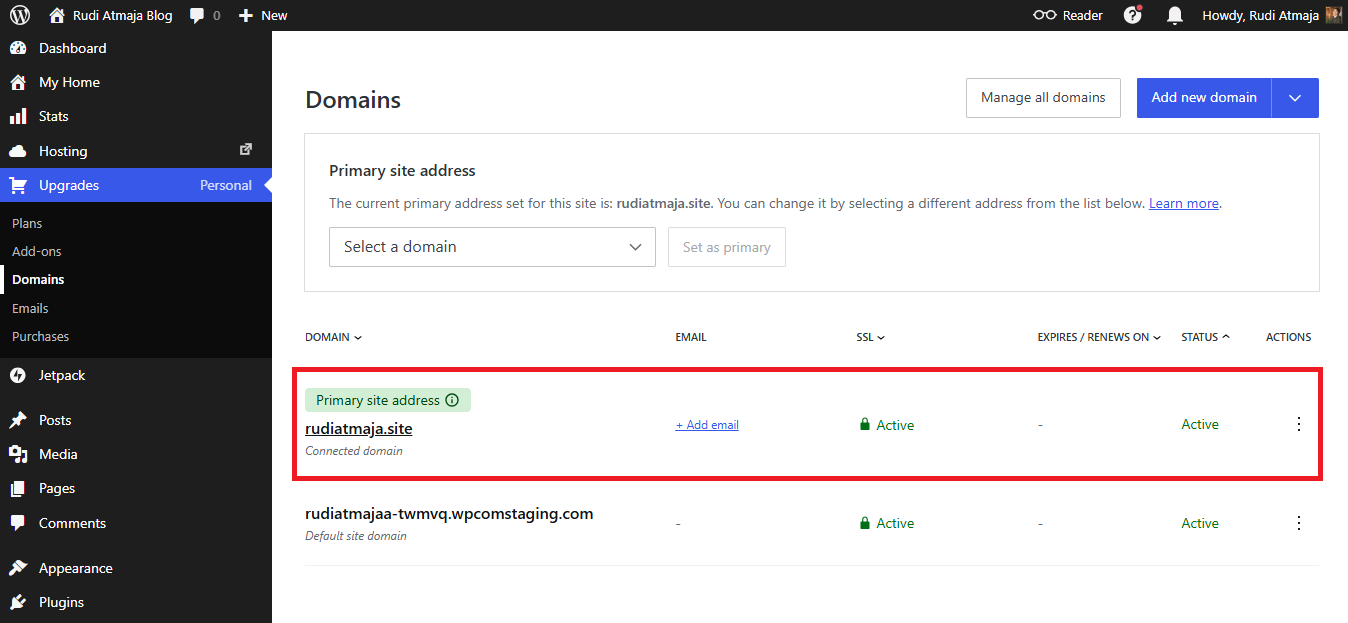
One of the first things you’ll notice when upgrading on WordPress.com is the free domain offer. If you choose a yearly, two-year, or three-year billing plan, you’ll get a domain name included for the first year. This means you can replace the default subdomain with something more personal. It’s a small change, but it makes your site look much more professional.
Instead of using a long and less flexible free URL, you can pick your own custom domain name. This is especially useful if you’re trying to build a blog, portfolio, or personal brand. A custom domain is easier to remember and looks more trustworthy to visitors. It also gives your site a cleaner and more polished identity.
Another advantage is the cost efficiency that comes with this feature. Normally, you would need to buy a domain separately from a domain registrar. That means spending extra money on top of your hosting plan. With this setup, you don’t have to worry about that during your first year.
Everything is handled in one place, so you don’t need to deal with external services or complicated setup. You simply choose your domain during the upgrade process and it’s connected automatically. This makes the whole experience much more beginner-friendly. It also saves time since you don’t need to configure anything manually.
2. 6GB Storage and Unlimited Bandwidth
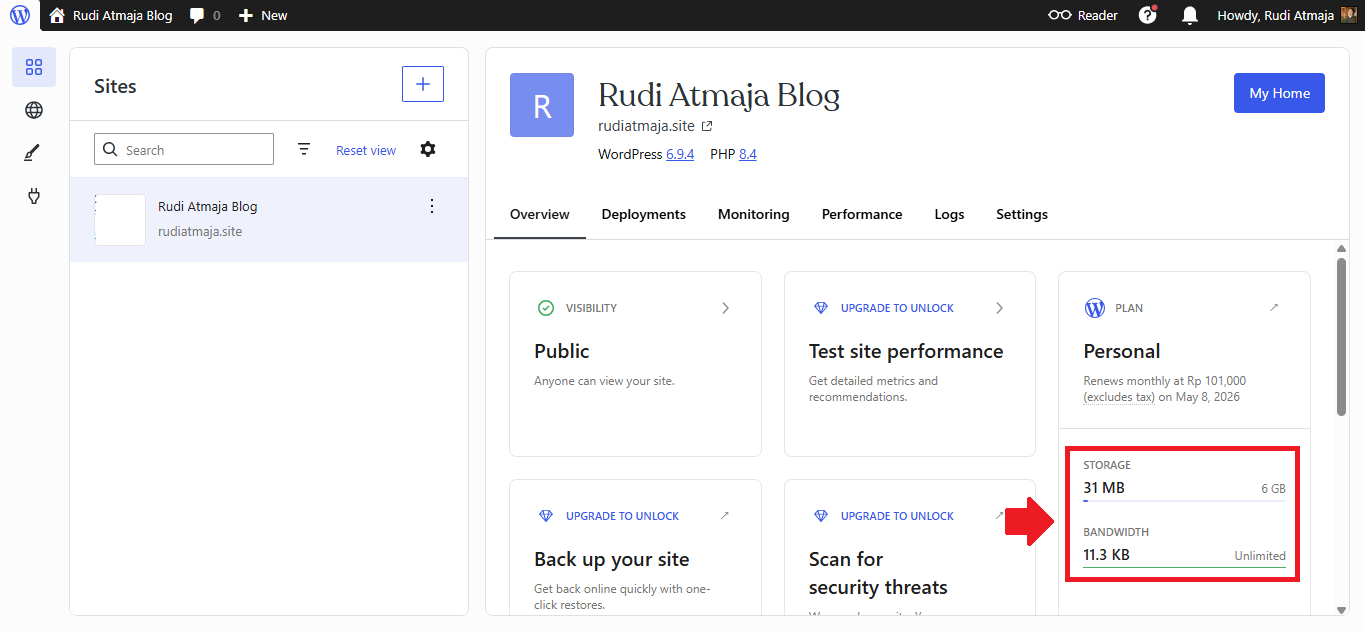
Another thing you’ll get when upgrading on WordPress.com is increased storage space. The Personal plan comes with 6GB of storage, which is a noticeable step up from the free version. This gives you more room to upload images, write longer posts, and manage your content without worrying too quickly about limits. For most personal blogs, this amount already feels quite comfortable.
With 6GB available, you can upload higher-quality images without needing to compress them too much. This is helpful if your blog relies heavily on visuals, like travel, food, or lifestyle content. Your posts can look better without sacrificing too much quality. Over time, that can make your site feel more engaging to visitors.
For text-based blogs, 6GB can last even longer than you might expect. Articles themselves don’t take up much space, so most of your storage usage will come from media files. As long as you manage your uploads reasonably well, you likely won’t hit the limit anytime soon. It’s enough for consistent blogging over a long period.
In addition to storage, you also get unlimited bandwidth with this plan. This means your site can handle as many visitors as it gets without extra charges. Whether your traffic is small or starts to grow, you don’t need to worry about hitting bandwidth limits. Your content stays accessible no matter how many people visit.
Unlimited bandwidth becomes more important as your blog starts getting shared or discovered by more people. Sudden traffic spikes won’t cause your site to slow down or stop working due to limits. This gives you more confidence to grow your content without thinking about technical restrictions. It removes one common concern that beginners often have.
Everything runs in the background without you needing to monitor usage constantly. You don’t have to check bandwidth stats or calculate how much traffic you can handle. It’s all included as part of the plan, so you can stay focused on creating content. That simplicity makes the overall experience feel more relaxed and manageable.
3. Install Plugins
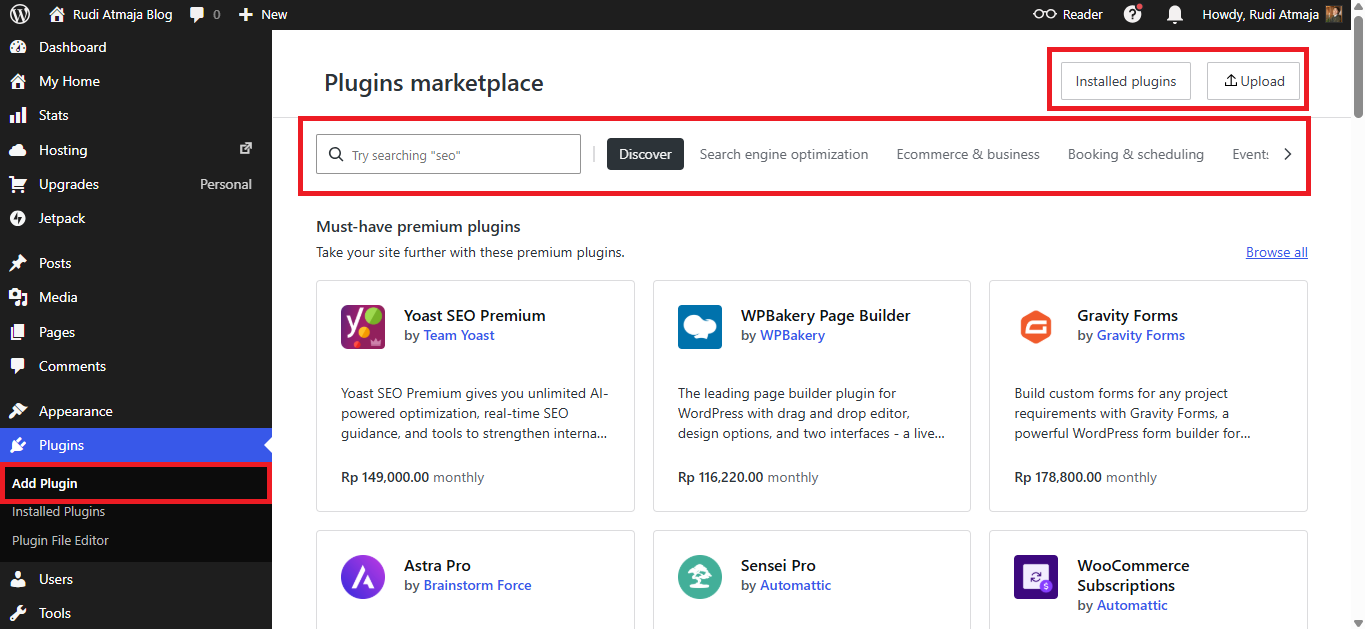
One of the things I was most curious about before upgrading on WordPress.com was plugin access. Plugins are a big part of what makes WordPress so flexible. On the free plan, this is quite limited, so you don’t really get much control. That’s why this feature felt important to explore.
With the Personal plan, you can install plugins to extend your site’s functionality. This includes plugins from WordPress.org, which means you get access to thousands of free tools. Whether you need SEO support, contact forms, or performance improvements, there are plenty of options available. It opens up a lot more possibilities compared to the free version.
You’re also not limited to free plugins only. If you find a premium plugin that fits your needs, you can install it as well. This gives you more flexibility to customize your site exactly the way you want. It also means your site can grow beyond basic blogging features when needed.
The process of installing plugins is quite straightforward once you get used to it. Everything is handled from your dashboard, so you don’t need to deal with complicated setups. You can search, install, and activate plugins in just a few steps. It’s simple enough even if you’re not very technical.
If you’ve never done this before, I’ve already written a separate guide that walks through the process step by step. You can check out my article titled “How to Install Plugins on WordPress.com” for a more detailed explanation. It covers the basics in a way that’s easy to follow.
4. More Theme Options
Another thing I really paid attention to when upgrading on WordPress.com was the theme selection. On the free plan, your choices feel quite limited. You can still build a decent-looking site, but customization options are not that flexible. That’s why I was curious to see what would change with the Personal plan.
With the Personal plan, you get access to more free themes that you can install and use right away. This gives you more freedom to experiment with different designs. You’re not stuck with the same small set of themes anymore. It already feels like a step up in terms of visual flexibility.
What makes it more interesting is that you’re not limited to themes inside WordPress.com only. If you find a free theme on WordPress.org, you can download it and install it on your WordPress.com site. This opens up a much wider range of design options. You can explore thousands of themes beyond what’s shown in the default library.
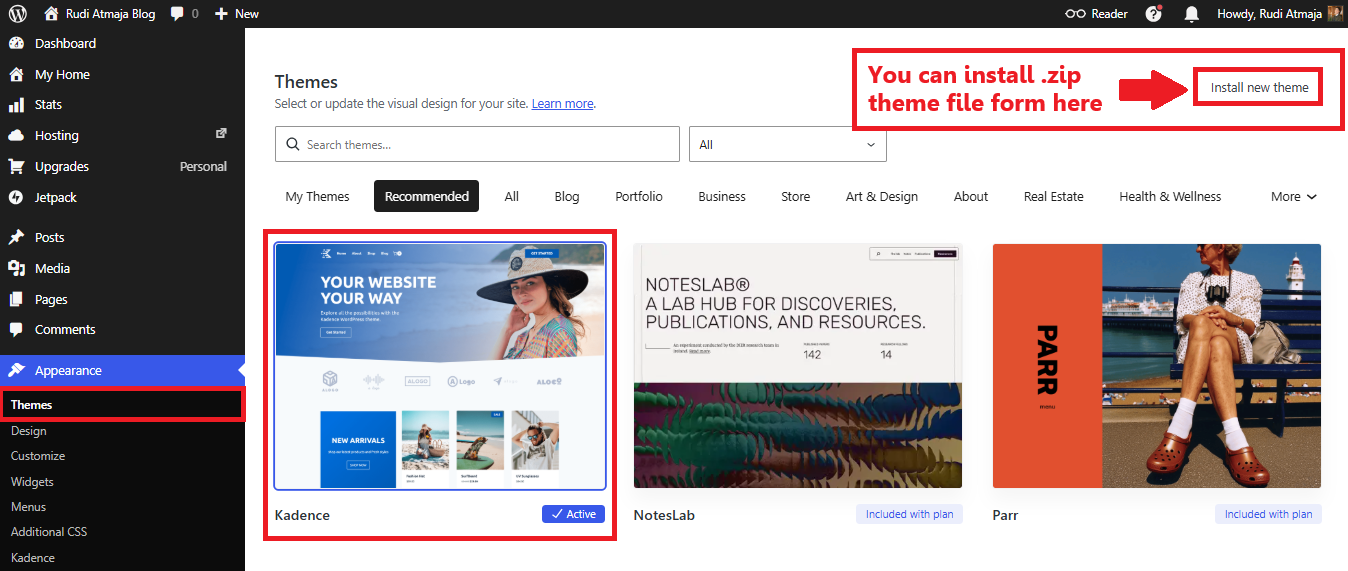
In my case, I decided to use the Kadence theme from WordPress.org. I installed the free version and used it on my blog. It worked smoothly and gave me more control over the layout and design. This is something I couldn’t fully get from the default options alone.
What’s interesting is that if you search for Kadence directly inside WordPress.com, it’s usually listed under higher-tier plans like Business. But by downloading the free version from WordPress.org, I was still able to use it on my Personal plan. That workaround makes a big difference if you know where to look.
This kind of flexibility allows you to build a site that feels more unique. You’re not limited to what’s “officially” available in your plan’s theme list. As long as the theme is free and available from the WordPress.org repository, you can try it out yourself. It gives you more control over how your site looks.
Instead of settling for basic designs, you can start exploring themes that match your style or niche better. Whether you want something minimal, modern, or more content-focused, there are plenty of options out there. Having that freedom makes the Personal plan feel much more useful in real use.
5. Built-in Cache
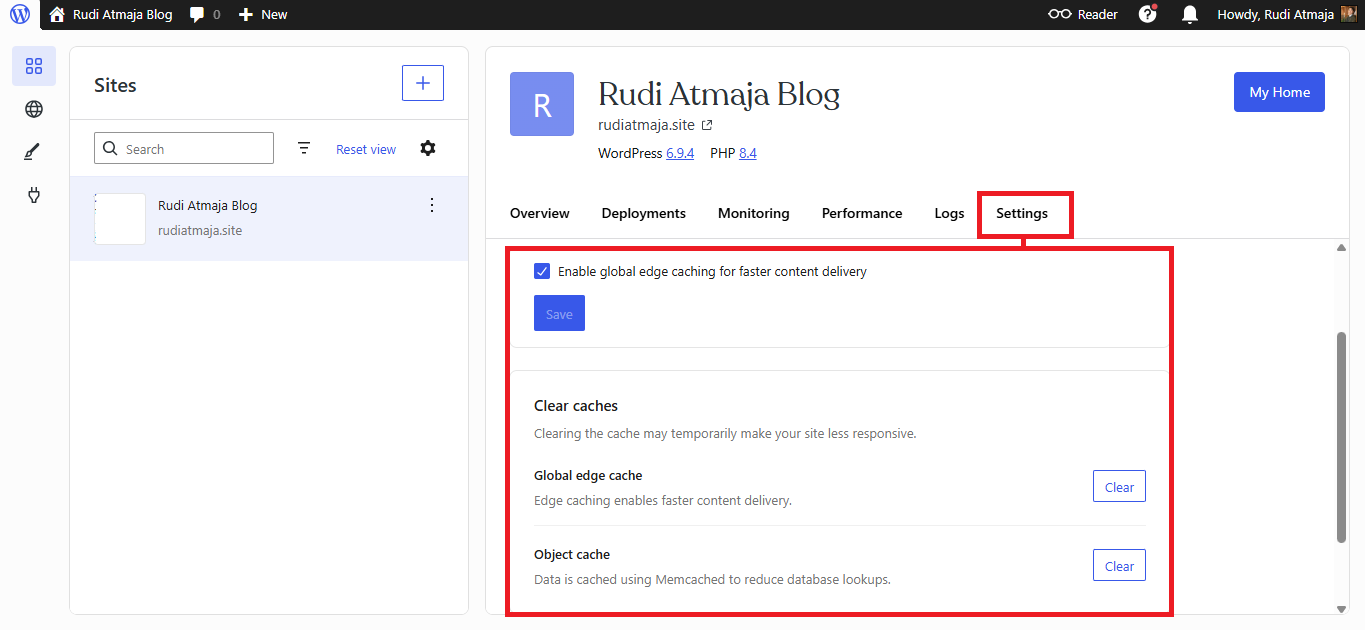
Another feature that comes with the Personal plan on WordPress.com is built-in caching. This is something you might not notice right away, but it plays an important role in how your site performs. In simple terms, caching helps your website load faster for visitors. And faster loading can make a big difference, especially as your content grows.
With this built-in cache system, you don’t need to install any extra plugins just to improve speed. Everything is already handled automatically in the background. This is especially helpful if you’re not very technical or don’t want to deal with performance settings. It keeps things simple while still giving you better results.
There’s also an option to clear the cache manually from the settings if needed. This can be useful when you make changes to your site but don’t see them immediately. By clearing the cache, you force the system to refresh everything. It’s a small feature, but it gives you a bit more control when managing your site.
Another thing worth mentioning is global edge caching. This helps deliver your content faster to visitors from different locations. So even if your audience is spread across different regions, your site can still load efficiently. It’s something that works quietly in the background without requiring any setup.
6. Free Custom Email
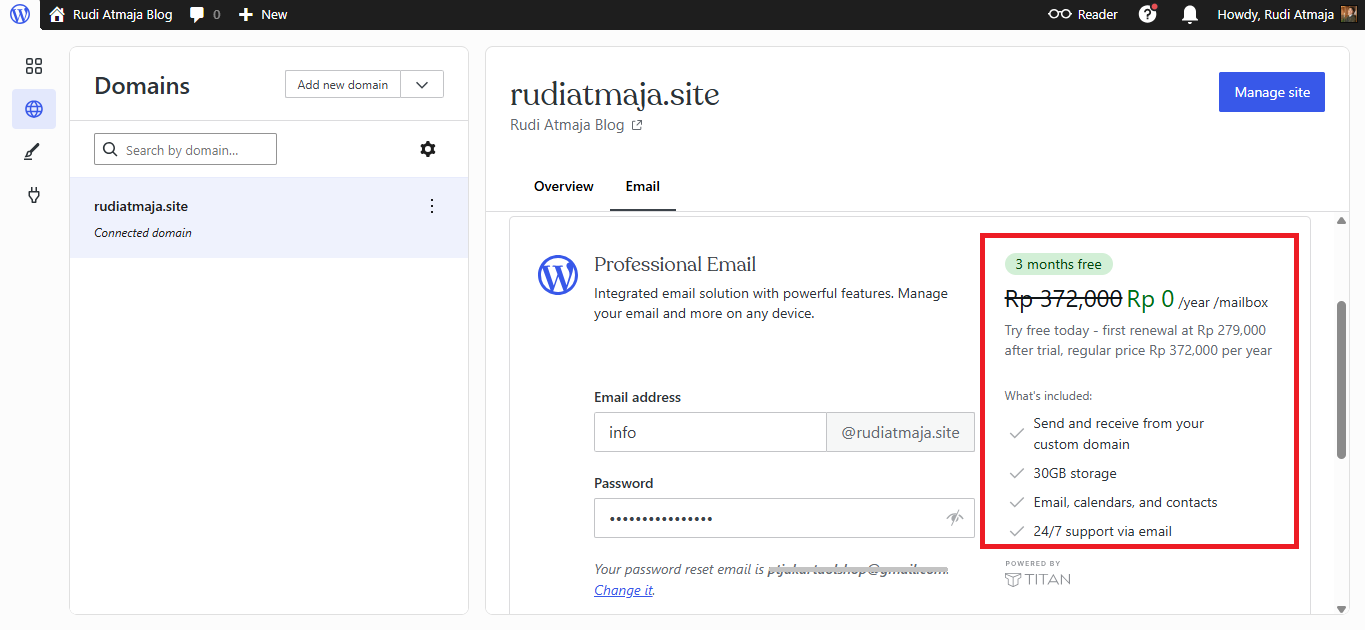
Another benefit you’ll get with the Personal plan on WordPress.com is access to custom email using your domain. This means you can create email addresses like [email protected] instead of using a generic email service. It instantly makes your communication look more professional. This is especially useful if you’re building a blog, brand, or small business presence.
What I found interesting is that this feature comes with a free 3-month trial. So you can try it out first without paying anything extra. During this period, you can set up your email, test how it works, and see if it fits your needs. It’s a nice way to explore the feature without any upfront commitment.
After the 3 months are over, you’ll need to pay if you want to continue using the service. The pricing is Rp 279.000 per year per account for the first year. If we convert that roughly using Rp 17,100 per USD, that’s around $16 per year. For a custom domain email, that’s still quite affordable.
For renewals in the following years, the price becomes Rp 372.000 per year per account. That’s roughly about $22 per year based on the same conversion. So there is a small increase after the first year, but it’s still within a reasonable range. Especially if you’re using it for something more serious than just casual emailing.
In terms of features, you can both send and receive emails using your custom domain. This makes your communication feel more consistent with your website. Instead of mixing personal and branded emails, everything stays under one identity. It’s a simple upgrade, but it makes a noticeable difference.
Each email account also comes with 30GB of storage. That’s more than enough for regular use, even if you receive a lot of emails with attachments. You don’t have to worry too much about running out of space anytime soon. It gives you plenty of room to manage your inbox comfortably.
The email service itself is powered by Titan, which also includes calendars and contacts. So it’s not just basic email, you get a more complete productivity setup. You can manage your schedule and contacts in one place. It feels closer to a full email platform rather than just a simple inbox.
Everything is integrated directly with your WordPress.com setup, so you don’t need to configure external services. The setup process is quite straightforward, even if you’ve never done it before. Once it’s active, it just works in the background. And that makes it easy to manage alongside your website.
7. Jetpack Social
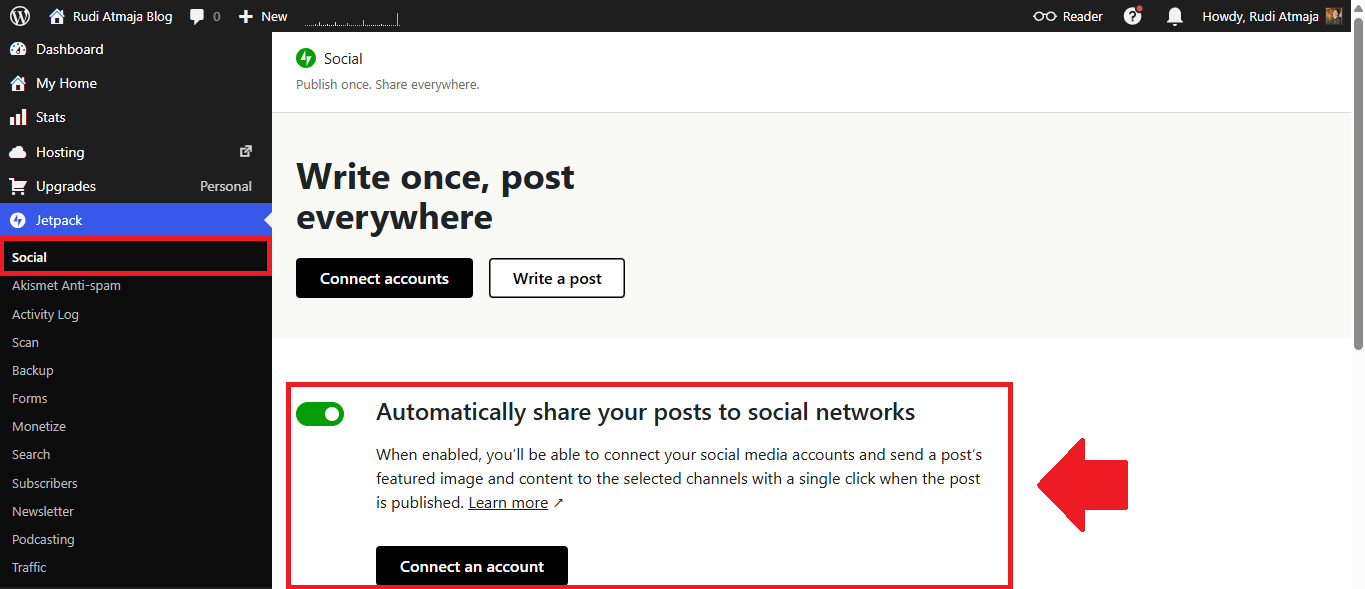
Another feature included in the Personal plan on WordPress.com is Jetpack Social. This feature is designed to make sharing your content to social media much easier. Instead of manually posting links every time you publish a new article, you can automate the process. It saves time and keeps your workflow simple.
Once enabled, you can connect your social media accounts directly from your dashboard. This usually includes platforms like Bluesky, Facebook, Instagram Business, and others depending on availability. After connecting them, your site is ready to share content automatically. You don’t need to switch between platforms anymore.
Every time you publish a post, Jetpack Social can send your featured image along with your content to your selected social channels. It happens with a single click, or even automatically if you set it that way. This makes it much easier to stay consistent with content distribution. Your posts can reach your audience faster without extra effort.
This feature is especially helpful if you’re managing your blog alone. You don’t have to worry about forgetting to share your content after publishing. Everything is handled in one place, directly from your WordPress dashboard. It’s a simple addition, but it makes content promotion feel more effortless.
8. Jetpack Podcasting
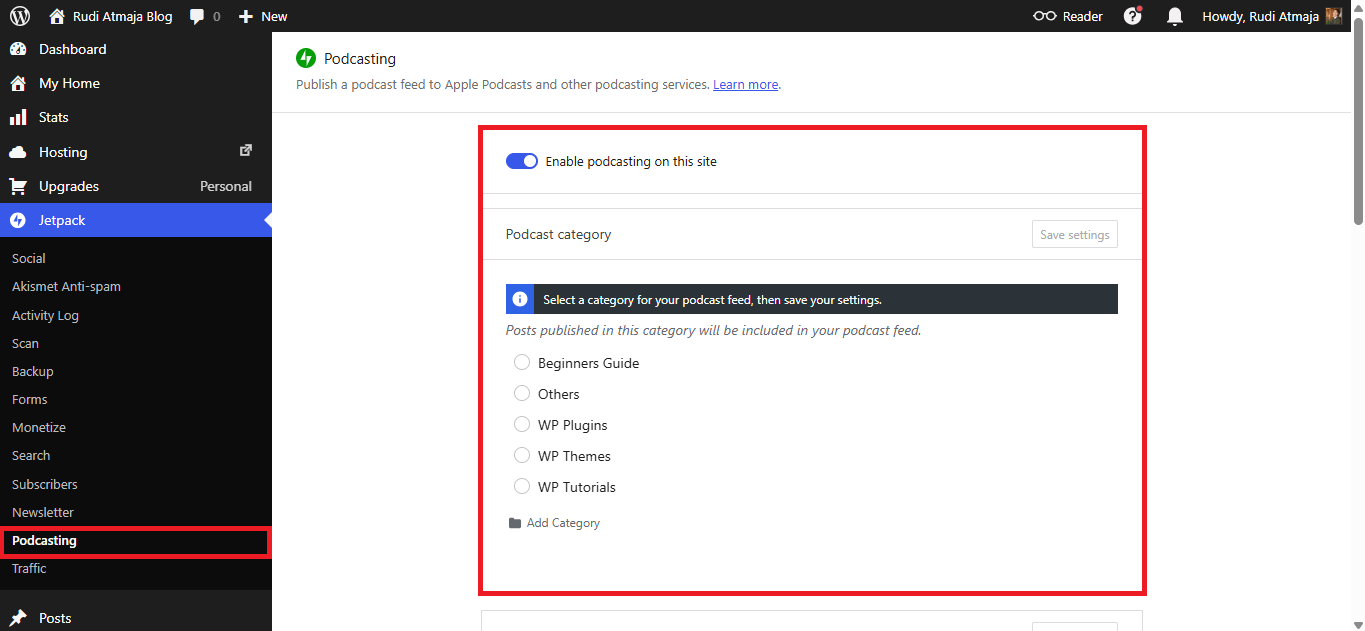
Another feature you’ll find in the Personal plan on WordPress.com is Jetpack Podcasting. This feature allows you to turn your site into a simple podcast publishing platform. You don’t need to use a separate service just to start sharing audio content. Everything can be managed directly from your dashboard.
Once enabled, you can create a dedicated podcast feed for your site. This feed can then be submitted to platforms like Apple Podcasts and other podcast directories. It works by using a specific category for your podcast content. Any post you publish under that category will automatically be included in your podcast feed.
The setup process is quite straightforward and doesn’t require technical knowledge. You just enable the feature, choose or create a category, and save the settings. After that, you can start publishing podcast episodes like regular posts. It feels very similar to blogging, just with audio content added in.
This makes it a convenient option if you want to experiment with podcasting without committing to a separate platform. You can manage both written and audio content in one place. It’s a simple way to expand your content format. And since it’s built into the system, everything stays easy to manage.
9. Jetpack Forms
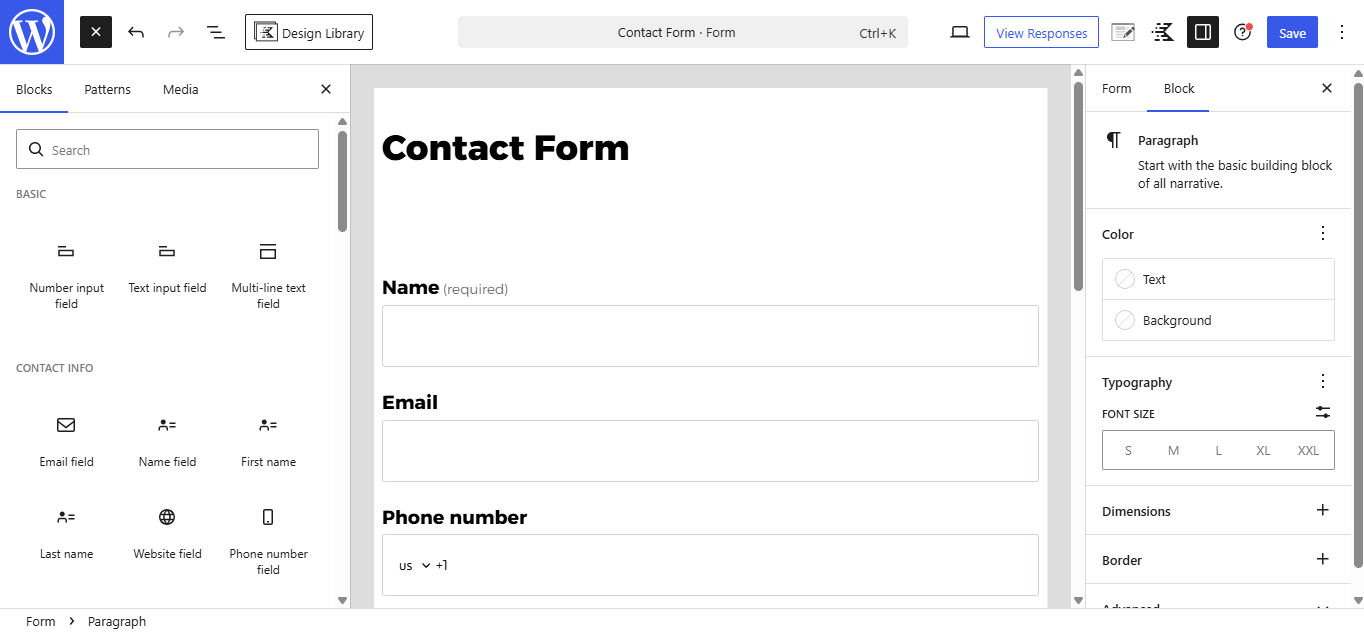
Another useful feature included in the Personal plan on WordPress.com is Jetpack Forms. This feature lets you create contact forms directly inside your website without needing extra plugins. It’s built right into the block editor, so you can add forms just like adding any other block. That makes the whole process feel very simple and straightforward.
You can create basic forms like contact forms, feedback forms, or simple inquiries. Fields like name, email, and message can be added in just a few clicks. You can also customize the structure depending on what information you want to collect. It’s flexible enough for most basic website needs.
Once someone submits a form, you can view the responses directly from your dashboard. There’s also an option to receive notifications via email. This makes it easy to keep track of messages without logging in all the time. Everything stays organized in one place.
10. Monetize Features
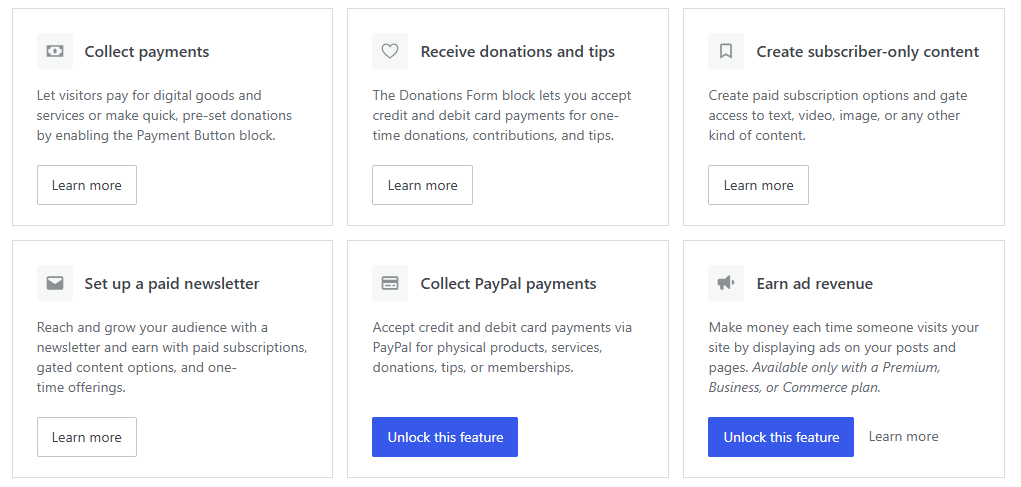
Another thing worth mentioning in the Personal plan on WordPress.com is monetization. Even though this plan is not fully focused on making money, there are still a few options you can explore. It’s more like a starting point rather than a complete monetization setup. But for a personal blog, it can already be useful.
You can, for example, collect payments or accept simple donations using built-in blocks. This works well if you want to receive support from your readers. You can also create subscriber-only content in a basic form. It’s not as advanced as higher-tier plans, but the option is there.
There’s also support for setting up a paid newsletter. This allows you to grow an audience and potentially earn from subscriptions. If you’re planning to build a small community around your content, this can be a nice addition. It gives you more ways to engage with your readers.
However, some monetization features are still locked behind higher plans. Things like earning ad revenue directly from WordPress.com or full payment integrations are not fully available here. So if your main goal is to monetize heavily, you might feel a bit limited. This plan is clearly more focused on content and basic growth.
11. Improve with AI
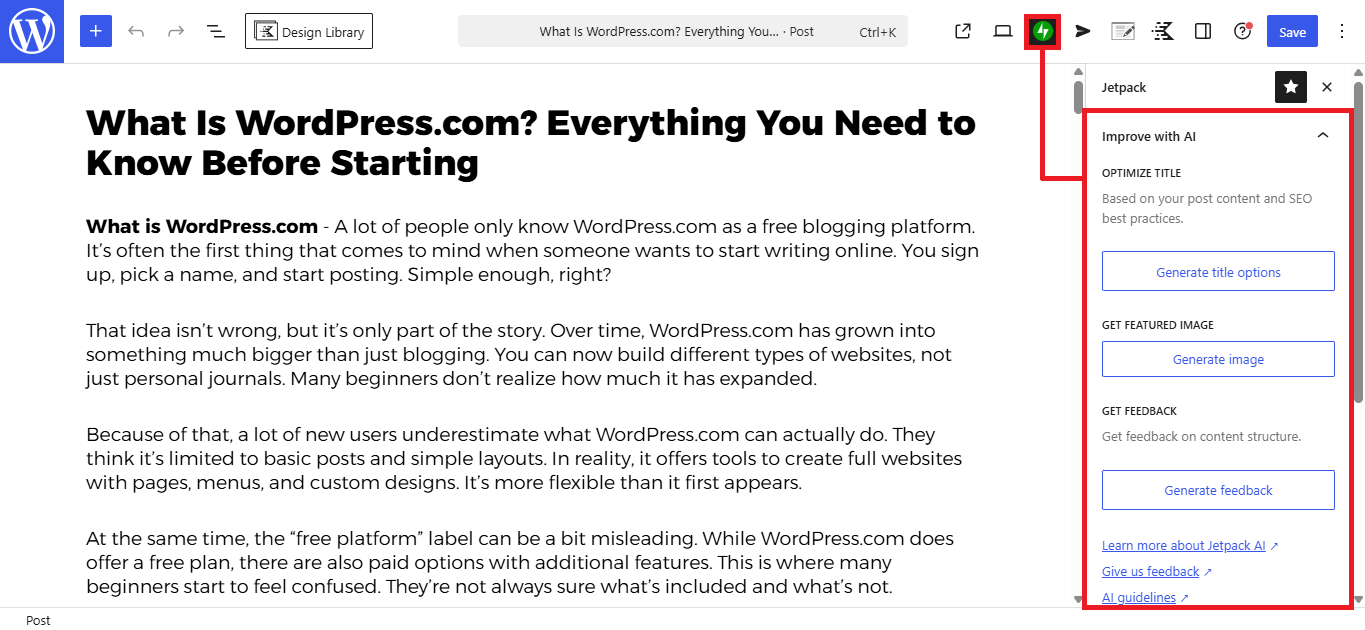
Another feature you’ll notice in the Personal plan on WordPress.com is the built-in Improve with AI tool. This feature is integrated directly into the editor, so you can use it while writing your posts. You don’t need to install anything extra or switch to another platform. It’s all available right where you create your content.
With this tool, you can generate title ideas, improve your writing, or get suggestions based on your content. For example, if you’re stuck on a headline, you can quickly generate multiple options. It helps speed up the writing process, especially when you’re not sure how to phrase something. It feels like having a simple assistant while you write.
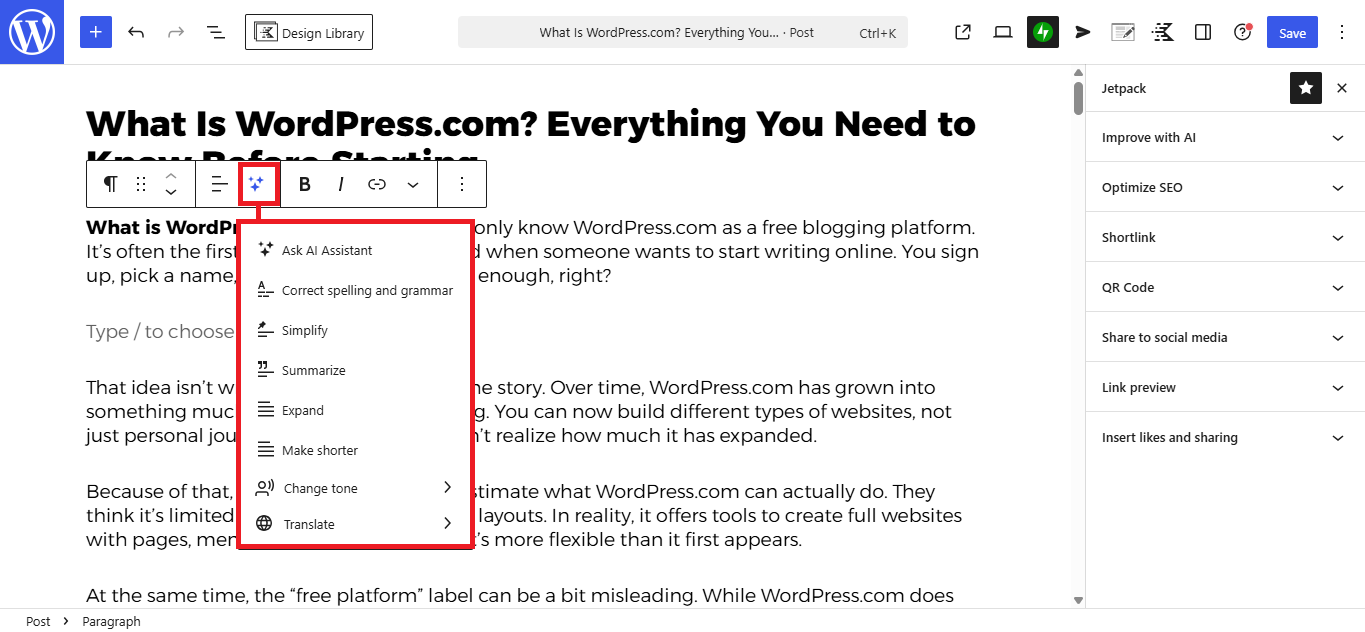
You can also use it to refine your paragraphs or adjust the tone of your content. This is useful if you want your writing to sound more natural or more structured. Instead of rewriting everything manually, you can get quick suggestions and tweak them as needed. It saves time, especially when you’re editing longer posts.
Another helpful part is the feedback feature. It can give you insights about your content structure and readability. This is useful if you want to make your article easier to follow for readers. Even small improvements here can make your content feel more polished.
My Opinion on the WordPress.com Personal Plan
After spending some time using the Personal plan on WordPress.com, I’d say it’s a comfortable upgrade from the free version. It removes some of the common limitations without making things feel too advanced or complicated. You get a more polished website, a custom domain, and better overall control. For everyday blogging, that already goes a long way.
I see this plan as a good fit for personal bloggers, beginners, or anyone who just wants a clean and simple site. If your main goal is to write, share ideas, or build an online presence without dealing with technical stuff, this plan makes sense. It gives you enough features to grow, but still keeps everything easy to manage. You don’t feel overwhelmed while using it.
At the same time, it’s important to be clear about expectations. The Personal plan is not really built for heavy monetization or advanced customization. It’s more about improving your blogging experience compared to the free version. If that’s what you’re looking for, then it does its job quite well.
If you’re aiming to make money from your site, I’d personally recommend going straight to the Premium plan. One of the main reasons is access to WordAds, which is WordPress.com’s built-in advertising program. With WordAds, you can display ads on your site and earn revenue directly without relying on external approval. This can be much easier compared to trying to get accepted by platforms like Google AdSense.
What I like is that you don’t really have to worry too much before trying. Whether you choose the Personal plan or even jump to the Business plan, there’s a refund policy in place. If you go with a monthly plan, you can request a full refund within 7 days. And if you choose a yearly, two-year, or three-year plan, you get up to 14 days for a full refund.
So there’s really not much risk in testing it out for yourself. You can explore the features, see how it feels, and decide if it fits your needs. If it doesn’t, you can simply cancel within the refund period. That flexibility makes it easier to try without overthinking the decision.
Final Thoughts
Overall, upgrading to the Personal plan on WordPress.com feels like a natural step if you’ve outgrown the free version. It gives you just enough improvements to make your site look more professional and run more smoothly. The features are not overwhelming, but they are practical for everyday blogging. It’s the kind of upgrade that focuses on simplicity and usability.
What stands out to me is how everything is already integrated in one place. You don’t need to rely on too many external tools just to make your site work properly. From domain to basic customization and built-in features, everything feels streamlined. That makes it easier to focus on creating content instead of dealing with technical setup.
At the end of the day, whether this plan is right for you depends on your goals. If you just want a clean, personal site with a bit more control, it’s a solid choice. But if you’re planning to grow faster or monetize seriously, you might want to consider a higher plan from the start. Either way, it’s a good place to begin your journey.