

What is WordPress Hosting – Starting a WordPress website sounds simple at first. You buy a domain, install WordPress, pick a theme, and start publishing. But somewhere along the way, you run into a term that feels slightly more technical than the rest: hosting. More specifically, what is WordPress hosting and do you actually need something special for it?
A lot of beginners assume hosting is just “a place where your website lives.” That’s technically true, but it doesn’t explain why WordPress hosting is often marketed differently from regular web hosting. So naturally, the next question becomes: what is WordPress hosting, and how is it different from the standard shared hosting plans you see everywhere?
Before we go deeper, it’s important to clarify something. When we talk about WordPress in this article, we’re referring to WordPress.org – the self-hosted version – not WordPress.com. WordPress.org gives you full control over your website, including themes, plugins, and hosting choices. If you’re still unsure about the difference, you might want to read our guide, “What is WordPress?”, where we explain how the platform actually works.
Now back to the main topic. When people search for what is WordPress hosting, they’re usually trying to figure out whether it’s just marketing language or a genuinely different type of service. The answer sits somewhere in between. While WordPress can technically run on most standard hosting environments, some hosting providers optimize their servers specifically for WordPress performance, security, and maintenance.
This is where things start to matter. Website speed, uptime, automatic updates, backups, caching, and server configuration all play a role in how smoothly your WordPress site runs. If your hosting environment isn’t properly optimized, even a well-designed site can feel slow or unstable. That’s one reason the question what is WordPress hosting keeps coming up among new website owners.
Another layer to consider is long-term growth. Maybe you’re starting with a simple blog today, but what happens when traffic increases? Or when you install heavier plugins? Or launch an online store? The type of hosting you choose can either support that growth or quietly limit it. Understanding what WordPress hosting is before choosing a plan can save you from migrating servers later.
So instead of rushing into the cheapest option available, it’s worth taking a few minutes to understand how WordPress hosting actually works, what makes it different, and whether it’s the right fit for your goals. Let’s break it down from the basics.
What is WordPress Hosting?
WordPress hosting is a type of web hosting environment specifically configured to support WordPress websites. Although WordPress can technically run on most standard hosting plans, WordPress hosting is tuned to match the platform’s technical requirements, including PHP configuration, database handling, and file structure optimization.
Unlike general hosting, which is designed to support many different content management systems, WordPress hosting focuses on one ecosystem. The server environment is typically adjusted to improve compatibility with WordPress themes, plugins, and core updates, reducing the likelihood of performance bottlenecks or configuration conflicts.
This type of hosting is commonly used for personal blogs and content-heavy websites. Sites that regularly publish articles, images, and multimedia content benefit from optimized database queries and caching systems that help maintain stable loading times as the content library grows.
Business websites are also well-suited for WordPress hosting. Company profiles, service-based websites, landing pages, and professional portfolios often rely on multiple plugins for SEO, security, analytics, and forms. A hosting environment configured for WordPress helps these elements function without unnecessary server-level friction.
Online stores built with WooCommerce are another common use case. eCommerce websites require consistent uptime, stable database performance, and secure transaction handling. WordPress hosting providers often adjust server resources and caching layers to accommodate dynamic product pages and shopping cart activity.
Membership sites, online learning platforms, and subscription-based websites also align well with WordPress hosting. These types of sites handle user registrations, login systems, and gated content, all of which depend heavily on database interactions and server response time.
Agencies and freelancers managing multiple WordPress projects may also use WordPress hosting plans that include staging environments, automated backups, and WordPress-focused security configurations. These features are designed to support ongoing development, updates, and maintenance within the WordPress framework.
Advantages and Disadvantages of WordPress Hosting
| Advantages | Disadvantages |
|---|---|
| Optimized server environment specifically for WordPress | Usually more expensive than basic shared hosting |
| Better performance through built-in caching and tuning | Limited flexibility if you want to run non-WordPress applications |
| WordPress-focused security configurations | Some managed plans restrict certain plugins |
| Easier setup with one-click or pre-installed WordPress | Less server-level control compared to VPS or dedicated hosting |
| Automatic updates and backups (on many plans) | Overkill for very small or low-traffic websites |
| WordPress-specialized technical support | Resource limits may still apply on entry-level plans |
One of the main advantages of WordPress hosting is performance optimization. Because the server environment is configured specifically for WordPress, it typically handles database queries, caching, and dynamic content more efficiently than generic hosting. This can translate into faster loading times and smoother performance, especially for content-heavy websites.
Security is another strong benefit. Since WordPress is a common target for attacks, many WordPress hosting providers implement firewall rules and monitoring systems tailored specifically to WordPress vulnerabilities. Some plans also include automatic core updates and regular backups, reducing the risk of outdated software causing security issues.
Ease of use is also a practical advantage. Many WordPress hosting plans come with pre-installed WordPress, staging environments, and simplified dashboards. For beginners, this removes much of the technical complexity involved in launching and maintaining a website.
However, there are trade-offs. WordPress hosting plans are often more expensive than standard shared hosting, particularly when labeled as “managed.” For very small websites or personal projects with minimal traffic, the additional cost may not always feel justified.
Another limitation is flexibility. WordPress hosting environments are optimized for WordPress and may not perform as well if you intend to run other applications on the same server. Some managed providers even restrict certain plugins that conflict with their built-in caching or security systems.
There is also the question of control. Advanced users who prefer full server customization may find managed WordPress hosting somewhat restrictive compared to VPS or dedicated server solutions, where deeper configuration options are available.
Resource limitations can still exist on lower-tier plans. Even though the environment is optimized, entry-level WordPress hosting packages may still operate under shared resource constraints, meaning performance can fluctuate if traffic spikes significantly.
Best WordPress Hosting in 2026
When talking about the best WordPress hosting in 2026, the conversation is no longer just about price. Performance consistency, uptime reliability, security layers, scalability, and real WordPress expertise matter far more than saving a few dollars per month. With search engines prioritizing site speed and user experience, hosting plays a direct role in SEO, conversions, and long-term growth.
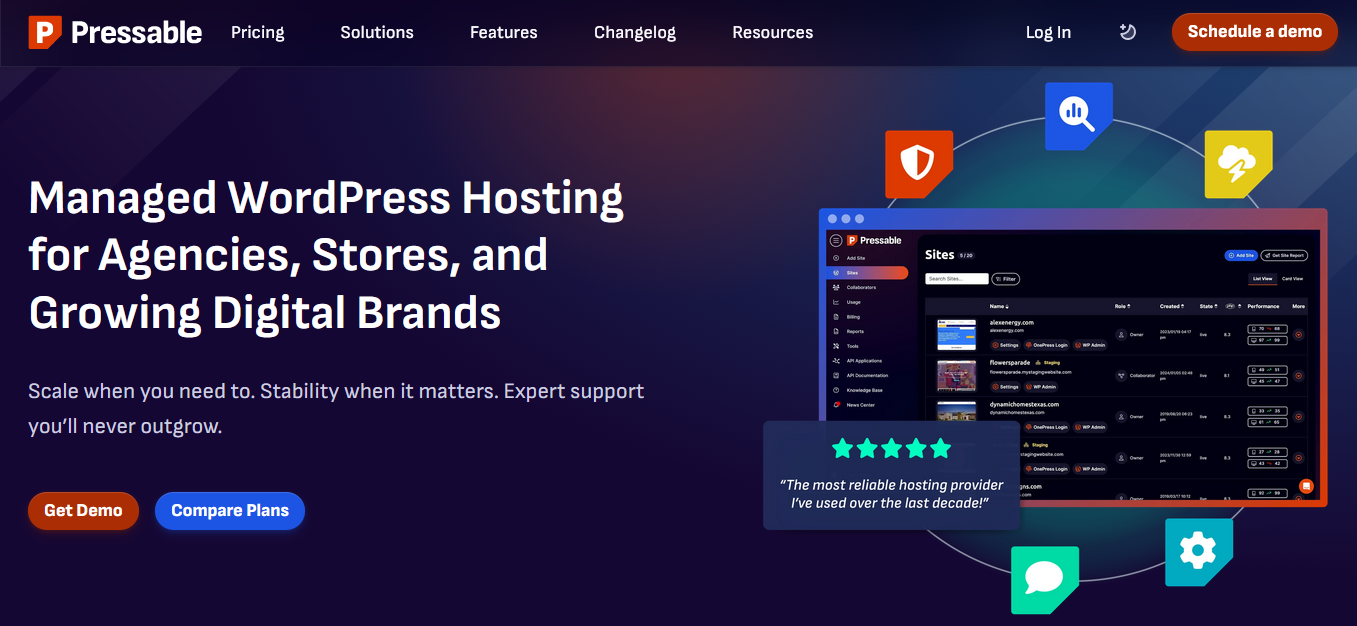
Among the many providers available today, Pressable stands out as a strong contender—especially for serious WordPress users. Pressable is built specifically for WordPress and is backed by the same parent company behind WordPress.com and WooCommerce. That alone gives it a level of platform familiarity that many generic hosting companies simply cannot match.
One of Pressable’s biggest advantages is managed WordPress infrastructure done properly. It includes automatic updates, real-time backups, advanced security monitoring, server-side caching, and global CDN integration. These features are designed to work seamlessly with WordPress without requiring heavy configuration on your end.
Performance is another area where Pressable differentiates itself. Instead of overselling shared servers, it focuses on stable architecture that can handle traffic growth. Whether you’re running a content site, business website, WooCommerce store, or membership platform, the environment is structured to maintain consistent loading speeds.
Customer support is also WordPress-focused. Rather than generic hosting responses, you get assistance from teams who understand WordPress core, plugin conflicts, performance optimization, and scaling requirements. For agencies and growing businesses, that level of technical familiarity can save time and prevent costly downtime.
If you’re looking for a hosting provider that prioritizes performance, reliability, and WordPress specialization in 2026, Pressable is worth serious consideration.
Before choosing any hosting provider, make sure your decision aligns with your website’s current size and long-term growth plans. Managed WordPress hosting like Pressable is particularly suitable for website owners who want stability, security, and scalability without handling server management themselves.
Final Thoughts
WordPress hosting is not just another marketing label — it’s a hosting environment specifically optimized to run WordPress efficiently. From server configuration and caching to security and support, the difference lies in how well the infrastructure aligns with the WordPress ecosystem. While standard hosting can technically run WordPress, optimized hosting is designed to help it perform more consistently under real-world conditions.
Throughout this article, we’ve covered what WordPress hosting is, who it’s suitable for, its strengths and weaknesses, and what to consider before choosing a provider. The right choice ultimately depends on your website’s purpose. A simple blog, a business website, and an online store will each have different performance and scalability needs.
It’s also important to remember that hosting affects more than just speed. It influences uptime, user experience, SEO performance, and your ability to handle growth. Choosing based purely on price often leads to limitations later. Choosing based on long-term value tends to be the smarter move.
If you’re serious about building a stable WordPress website in 2026, take the time to evaluate your goals, expected traffic, and technical requirements before making a decision. A strong hosting foundation makes everything else — design, content, marketing, and optimization — significantly easier to manage.