



Rank Math SEO vs AIOSEO – Rank Math SEO and AIOSEO are two names that keep popping up whenever people talk about WordPress SEO plugins. Some folks swear Rank Math is the better option, while others are just as confident that AIOSEO wins by a mile. So if you’re currently trying to decide which one fits your WordPress site, you’re definitely not alone in this.
Before going any further, I need to clarify that when I say WordPress here, I’m referring to WordPress.org, not WordPress.com. They might look similar at first glance, but in practice they work quite differently in terms of control and flexibility. If you’re curious about the differences, I’ve already covered it in my article “What is WordPress?”, so feel free to check that out.
Now, back to the plugins. Both Rank Math SEO and AIOSEO come with free versions that you can start using right away without spending anything. On top of that, they also offer paid upgrades if you ever need access to more advanced features down the line.
Even though there are premium options available, most people won’t jump straight into buying them. It’s pretty normal to stick with the free version first, just to get a feel for how the plugin works on your site. That way, you can decide whether it’s worth upgrading or not based on your own experience and needs.
I also want to be upfront with you here. I’m actually a Rank Math SEO affiliate, and I’ve been using it for over a year across almost all the sites I manage, including RudiAtmaja.com. I’ve also been using Rank Math Pro for more than a year now, thanks to the opportunity they gave me to try it out.
A few months ago, I came across an article that recommended AIOSEO over Rank Math SEO. It was published by a pretty well-known WordPress blog, so there’s a good chance you’ve heard of it too. After reading it, I got curious and decided to test AIOSEO on one of my other sites, indomadridista.com.
After about three months of using it, I felt like writing this piece could actually help people who are stuck choosing between the two. Instead of installing both plugins one by one – which can add unnecessary load to your hosting and leave leftover data in your database – you can save time by learning from someone else’s experience. And just to be clear, even though I’m a Rank Math affiliate, everything I share here comes from my own hands-on use, and I’m not here to force you to agree or to say that other opinions are completely wrong either.
At the end of the day, the decision of which plugin to use is completely yours.
Rank Math SEO vs AIOSEO: Features
What do most people want to know first before deciding on a plugin? Features, without a doubt. It’s usually the very first thing that comes to mind before anything else.
I feel like this is something we all do, whether we realize it or not. You, me, and pretty much everyone else want to understand what we’re getting before making a choice. It just makes sense to look at the features before committing to a plugin.
After all, features are what shape the overall experience. They determine how useful the plugin will be and whether it actually fits your needs. Without the right set of features, even a popular plugin can feel lacking.
So instead of guessing, it’s better to take a closer look at what’s actually offered. That way, you can make a more confident decision based on real information. Let’s go through the features available in Rank Math SEO and AIOSEO and see how they compare.
1. Rank Math SEO
First, let’s take a look at what Rank Math actually offers in terms of features. One thing that stands out right away is its modular system, which makes things feel more organized and flexible. Instead of dealing with everything at once, you can simply turn features on or off depending on what you need.
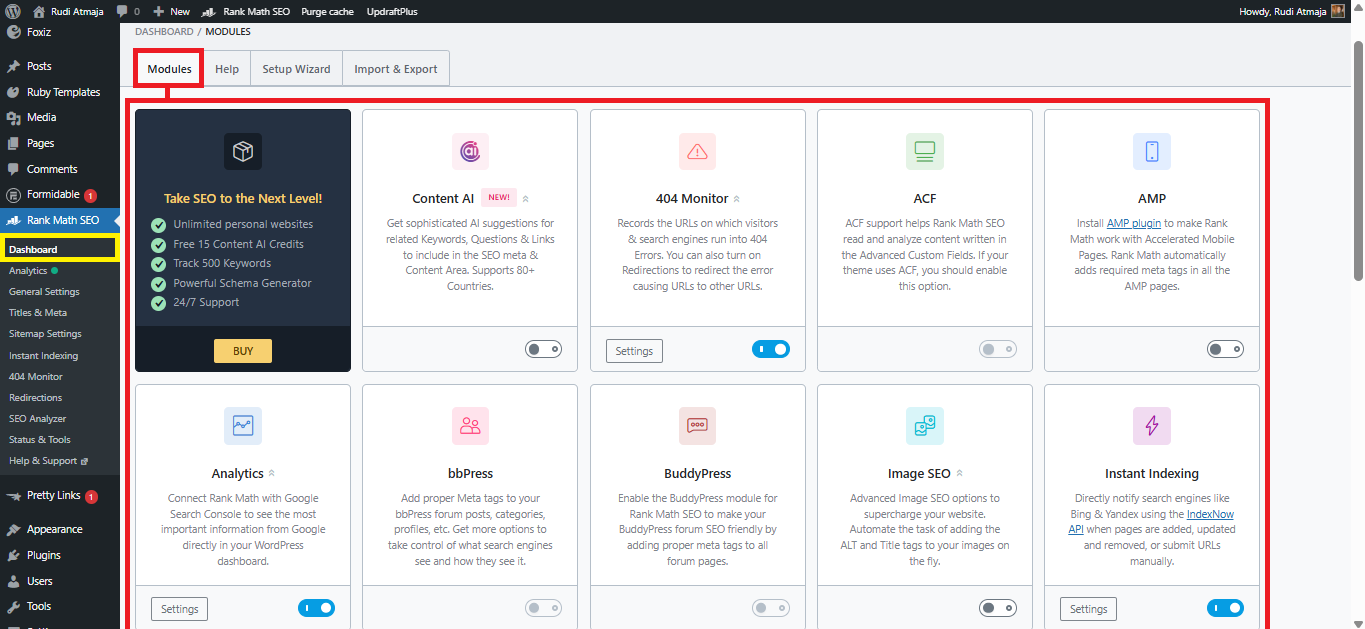
All of these modules are managed from a single place, which you can find under Rank Math SEO > Dashboard. From there, it’s pretty easy to see which modules are active and which ones are not. If you want to tweak a specific module, you can just click the “Settings” button inside the module box and adjust it from there.
Now, there are a few modules that I personally don’t use on my own sites. Because of that, I don’t have screenshots to show for those particular features. Still, I think it’s worth mentioning them since they might be useful for your setup in the future.
Even if I haven’t used some of these modules myself, I’ll still explain what they do. That way, you’ll have a clearer picture of what Rank Math is capable of overall. So with that in mind, let’s get started and go through them one by one.
1.1. 404 Monitor
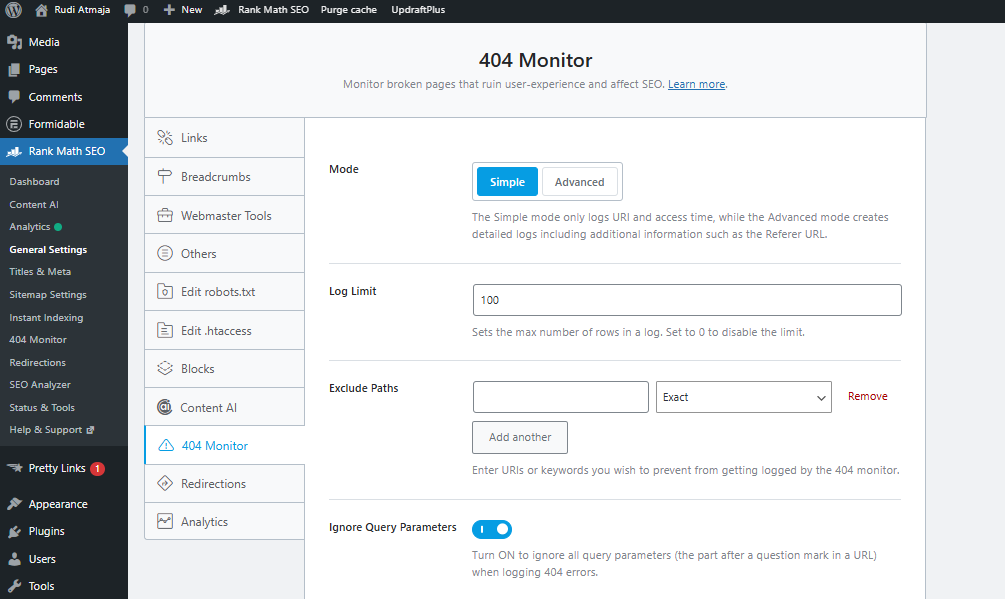
Now that we’re getting into the features, let’s start with the 404 Monitor. This feature helps you track pages on your website that return a 404 error, which basically means the page can’t be found. It usually happens when a page is deleted, a URL is changed, or someone enters the wrong address.
What’s useful here is that Rank Math automatically records every 404 visit on your site. You can see which URLs are being accessed and how often they are hit. This makes it much easier to identify broken links without having to check things manually.
By having this data, you can quickly decide what action to take. You might want to fix the broken link, recreate the page, or redirect users to a more relevant URL. This helps prevent visitors from landing on dead pages and leaving your site.
Inside this feature, there’s also an option called Exclude Paths. This allows you to ignore specific URLs or patterns so they don’t appear in your 404 logs. It’s especially useful for filtering out unnecessary entries and keeping your reports focused on issues that actually need your attention.
1.2. ACF (Advanced Custom Fields)
Next up is ACF, which stands for Advanced Custom Fields. This feature in Rank Math SEO is designed to work alongside the popular ACF plugin used in WordPress. It allows you to better optimize content that uses custom fields instead of just relying on the default editor.
If you’re not familiar with ACF, it’s commonly used to create custom content structures. For example, instead of writing everything in one editor, you might have separate fields for things like product details, reviews, or extra metadata. Rank Math can read and analyze this data so it can still be optimized for SEO.
With this integration, Rank Math includes content from your custom fields in its SEO analysis. That means your focus keyword checks, readability, and other optimization signals won’t miss important information stored outside the main content area. It helps ensure your entire page is properly evaluated.
This is especially useful for more advanced websites that rely heavily on structured content. Without this feature, a lot of important data might be ignored by the SEO analysis. By supporting ACF, Rank Math makes it easier to optimize more complex page setups.
1.3. AMP (Accelerated Mobile Pages)
Next, we have AMP, which stands for Accelerated Mobile Pages. This feature is designed to help your website load much faster on mobile devices. It works by creating a simplified version of your pages that removes unnecessary elements and focuses on speed.
Rank Math integrates with AMP to make sure your optimized content still performs well on these lightweight pages. Even though AMP pages are stripped down, you can still control important SEO elements like titles, meta descriptions, and schema. This ensures your mobile pages remain search-friendly.
This is especially important because a large portion of web traffic now comes from mobile users. A slow-loading page can quickly drive visitors away, even if your content is good. AMP helps reduce load times and improves the overall browsing experience on smaller screens.
With Rank Math handling the SEO side of AMP, you don’t have to worry about losing optimization when using this technology. Your content stays consistent across both regular and AMP versions. This makes it easier to maintain performance without sacrificing visibility in search results.
1.4. Analytics
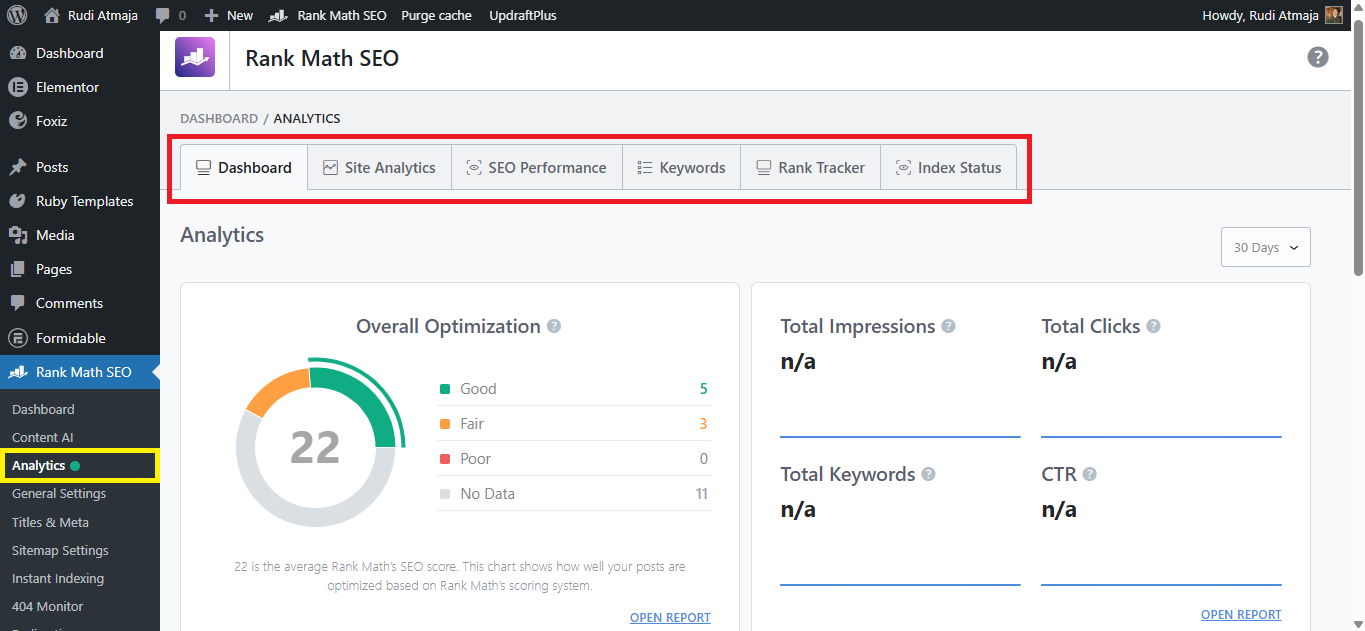
Next, we have the Analytics feature in Rank Math SEO. This is one of the features that feels a bit more advanced compared to the others. It’s designed to bring important SEO data directly into your WordPress dashboard.
One of the main things it does is connect your website with Google Search Console. You can submit and verify your site automatically without going through the usual manual steps. This makes the setup process much simpler, especially if you’re not very technical.
After connecting, you’ll get access to Site Analytics inside your dashboard. This section shows how your content is performing based on categories like Good Score, Fair Score, Poor Score, and No Data. It gives you a quick overview of which posts are doing well and which ones still need attention.
There’s also a section called SEO Performance that focuses on overall search metrics. You can see data like total impressions, total clicks, total keywords, CTR, and your average position. Having this information in one place makes it easier to track how your site is growing over time.
Another useful part is the Keywords breakdown. This feature groups your rankings into categories such as Top 3 positions, 4–10 positions, 10–50 positions, and 51–100 positions. It helps you understand where your keywords currently stand in search results.
By looking at these keyword groups, you can quickly spot opportunities for improvement. For example, keywords sitting in positions 4–10 might only need a small push to reach the top 3. This kind of insight makes it easier to decide where to focus your optimization efforts.
1.5. bbPress
Next, we have bbPress integration in Rank Math SEO. This feature is especially useful if your website includes a forum powered by bbPress. It allows you to optimize forum pages just like you would with regular posts and pages.
Forums usually contain a lot of user-generated content, which can be valuable for SEO if handled properly. With Rank Math, you can apply SEO settings to forum topics, replies, and other bbPress elements. This helps ensure that your forum content is structured and optimized for search engines.
Rank Math also allows you to control important SEO elements on bbPress pages. You can manage titles, meta descriptions, and even schema settings to make your forum content more visible in search results. This is something that would otherwise require extra configuration or additional plugins.
By having built-in support for bbPress, Rank Math makes it easier to turn your forum into an SEO asset. Instead of being overlooked, your discussion pages can actually contribute to your overall search performance.
1.6. BuddyPress
Next, we have BuddyPress integration in Rank Math SEO. This feature is aimed at websites that use BuddyPress to build online communities or social platforms. It helps ensure that all those dynamic pages are still optimized for search engines.
BuddyPress typically generates a lot of user-based content like profiles, activity feeds, and group pages. Without proper SEO handling, many of these pages can be difficult for search engines to understand. Rank Math steps in to make sure these elements are still SEO-friendly.
With this integration, you can control key SEO settings across BuddyPress pages. This includes things like meta titles, descriptions, and how content appears in search results. It gives you more flexibility compared to leaving everything at default settings.
Another benefit is that it helps prevent common SEO issues on community-driven sites. For example, duplicate or thin content can sometimes appear in user-generated sections. Rank Math provides better control so you can manage how these pages are indexed.
This makes a big difference if your website relies heavily on community interaction. Instead of having messy or unoptimized pages, you can keep everything structured and more aligned with SEO best practices.
1.7. Image SEO
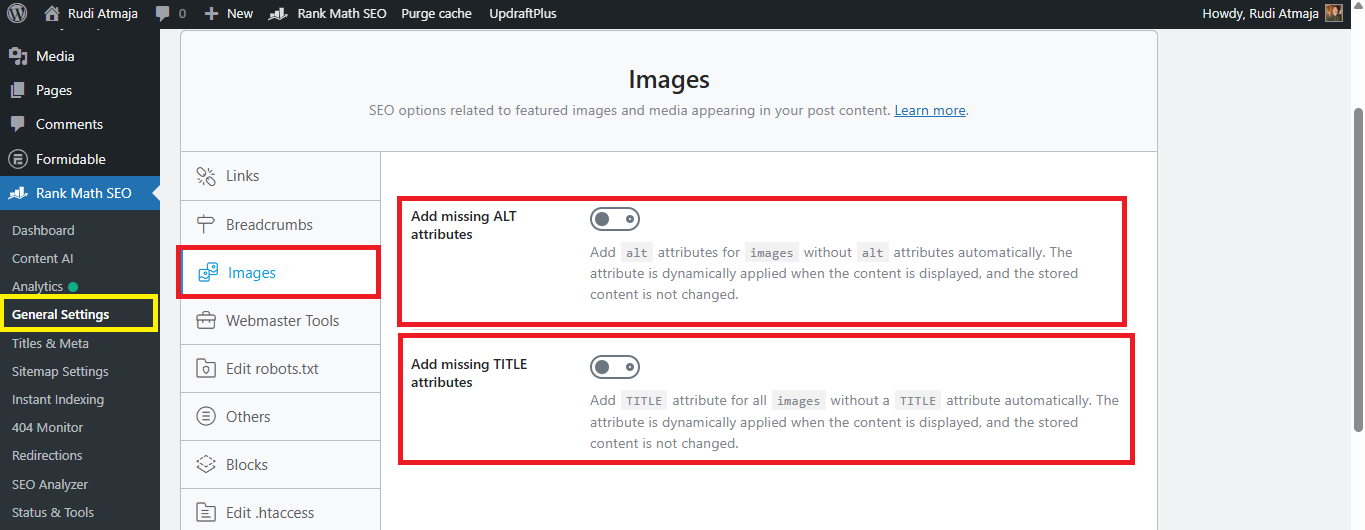
Next, let’s talk about the Image SEO feature in Rank Math. This feature focuses on optimizing your images so they can contribute to your overall SEO. Since images are an important part of most content, optimizing them properly can make a noticeable difference.
One of the key features here is the ability to automatically add missing ALT attributes. If your images don’t have alt text, Rank Math will generate and apply it for you. This helps search engines understand what the image is about without you having to edit each one manually.
What’s interesting is that this change is applied dynamically. That means the ALT attributes are added when the content is displayed, not directly stored in your database. So your original content remains unchanged while still benefiting from better optimization.
There’s also a similar feature for TITLE attributes. Rank Math can automatically add missing TITLE attributes to your images as well. Just like the ALT feature, this is handled dynamically without modifying your saved content.
These features are especially helpful if you have a lot of existing content with unoptimized images. Instead of going back and editing everything one by one, you can let Rank Math handle it in the background.
1.8. Instant Indexing
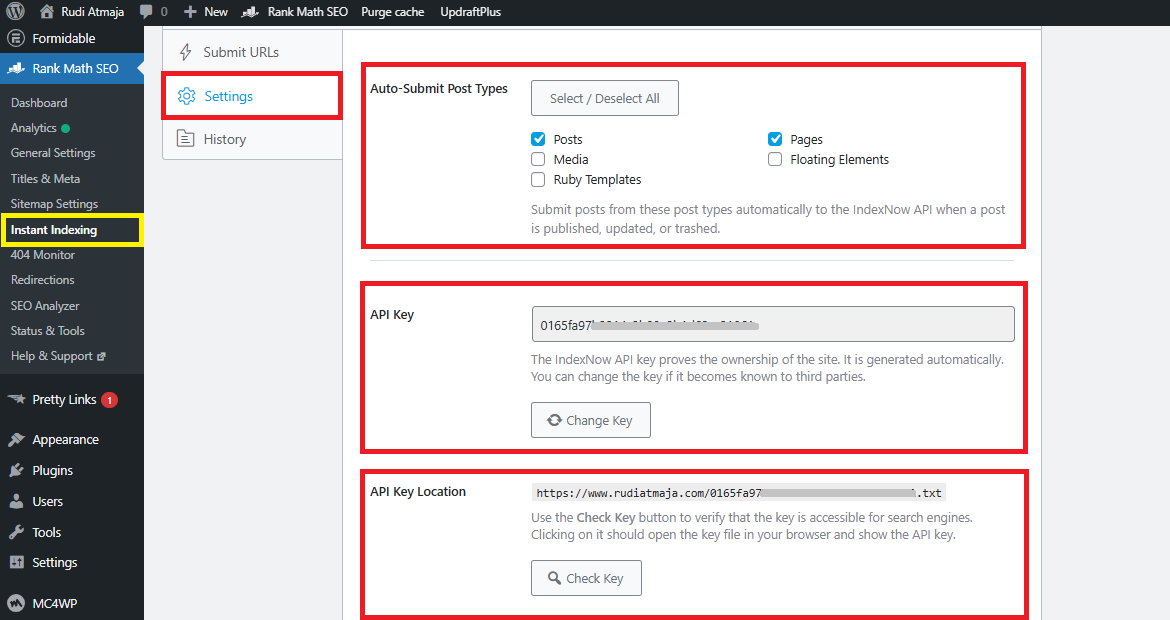
Next, we have the Instant Indexing feature in Rank Math SEO. This feature allows you to notify search engines like Bing and Yandex instantly whenever you add, update, or delete content. It works using the IndexNow API, so changes on your site can be picked up much faster.
Instead of waiting for search engines to crawl your site naturally, you can actively send signals to them. You can also submit URLs manually if needed, which is useful when you’ve just published or updated important content. This helps speed up the indexing process and makes your content visible sooner.
There’s also an option called Auto-Submit Post Types. With this, you can choose which types of content should be automatically submitted to search engines. For example, you might want posts to be submitted instantly, but not pages or other custom post types.
To make all of this work, Rank Math provides settings for API Key and API Key Location. These are used to connect your site with the IndexNow service properly. Once configured, everything runs in the background without requiring much ongoing effort.
1.9. Link Counter
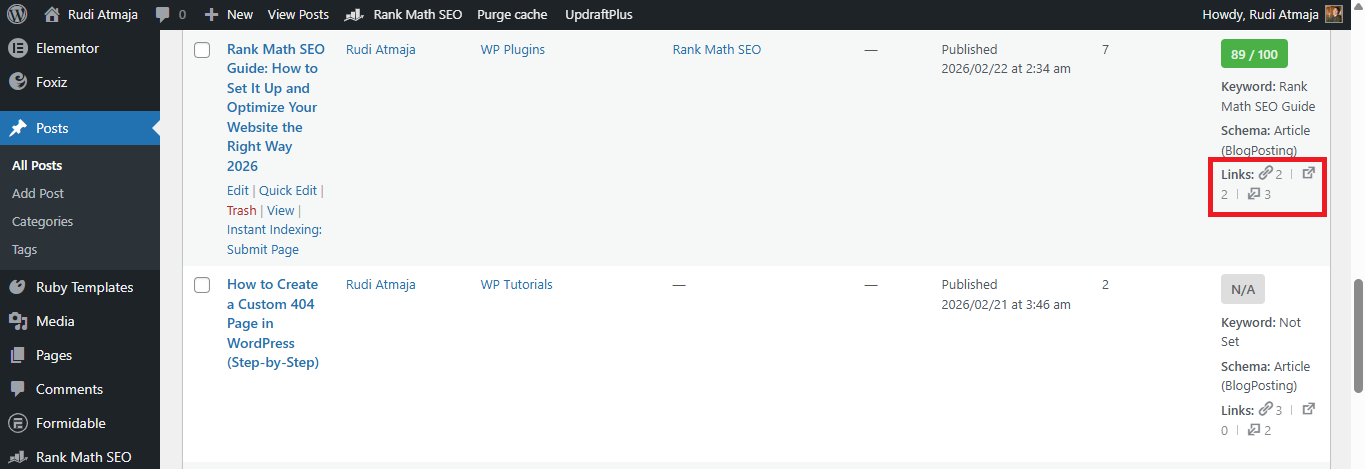
Next, we have the Link Counter feature in Rank Math SEO. This feature helps you track the number of links inside your content. It counts both internal links and external links, giving you a clearer view of how your posts are structured.
With this, you can see how many links are pointing to other pages on your site and how many are going outside. It also tracks links coming into a post, which is useful for understanding your internal linking strategy. This kind of insight can help you balance your links more effectively.
What makes it even more convenient is that you can see these counts directly from the Posts List page in WordPress. So you don’t need to open each post one by one just to check the links. Everything is visible at a glance, making it easier to manage your content.
1.10. LLMS.txt
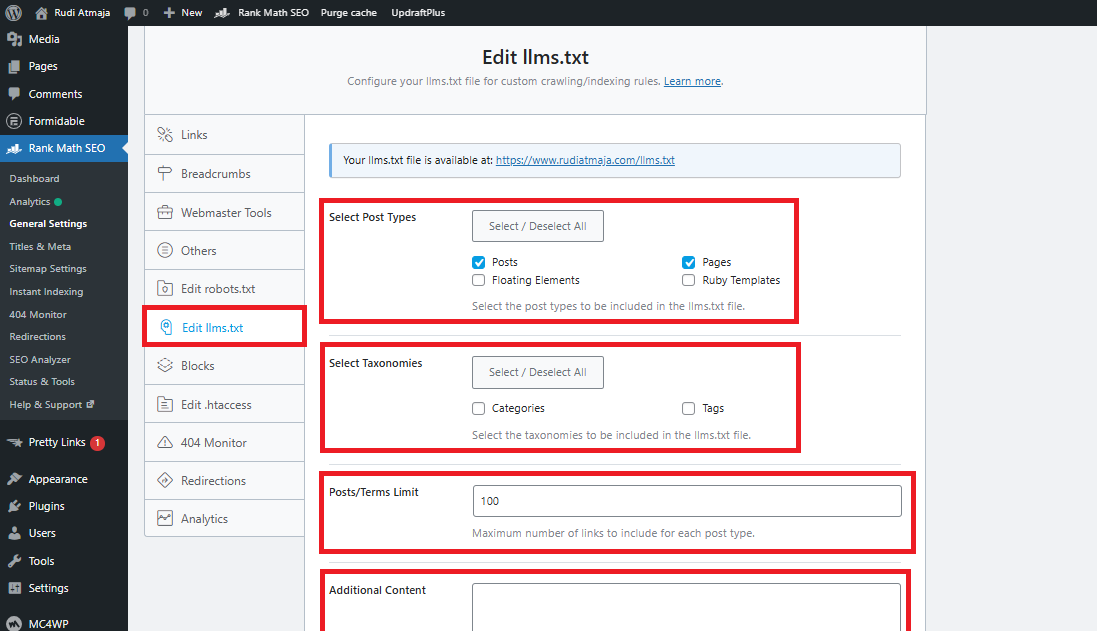
Next, we have the LLMS.txt feature in Rank Math SEO. This feature lets you create and serve a custom llms.txt file for your website. Its main purpose is to guide AI models by pointing them to your most important content, such as posts, pages, and other key sections.
With this file, you can control what kind of content you want AI systems to prioritize. Instead of letting everything be interpreted randomly, you’re giving clear signals about which parts of your site matter the most. This can be especially useful as AI-driven search and content discovery continue to grow.
Inside the settings, you’ll find options like Select Post Types and Select Taxonomies. These allow you to choose exactly which content types and categories should be included in the llms.txt file. You also have a Posts/Terms Limit option to control how many items are listed.
There’s also an Additional Content field where you can manually add extra information. This gives you more flexibility if you want to highlight specific pages or include custom instructions. It helps you fine-tune how your website is presented to AI systems.
1.11. Local SEO
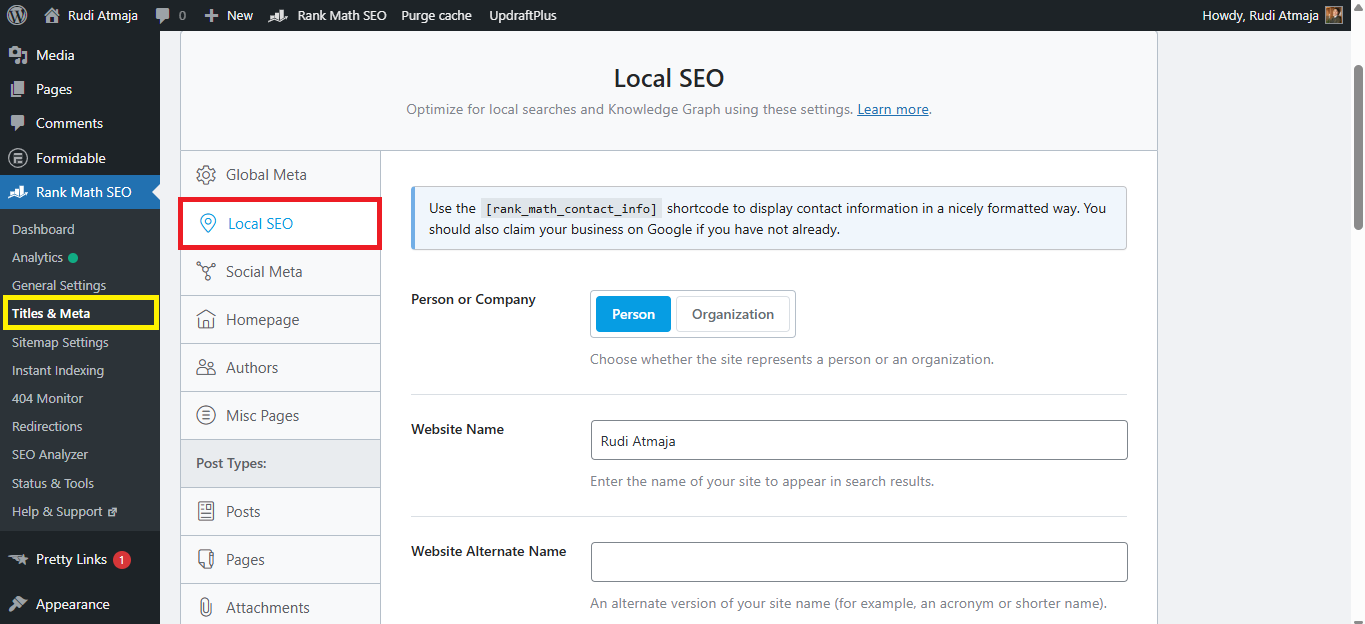
Next, we have the Local SEO feature in Rank Math SEO. This feature is designed for websites that target a specific geographic area or serve local customers. It helps search engines better understand your business location and relevance for local searches.
With Local SEO enabled, you can add important business details directly into your website. This includes information like your business name, address, phone number, and opening hours. All of this data helps search engines display your business more accurately in local results.
Rank Math also adds structured data (schema) for your business automatically. This makes it easier for search engines to recognize your site as a local business. As a result, your chances of appearing in local listings or map results can improve.
This feature is especially useful for small businesses, agencies, or anyone offering services in a specific area. Instead of competing globally, you can focus on ranking within your local region. That makes your SEO efforts more targeted and often more effective.
1.12. Redirections
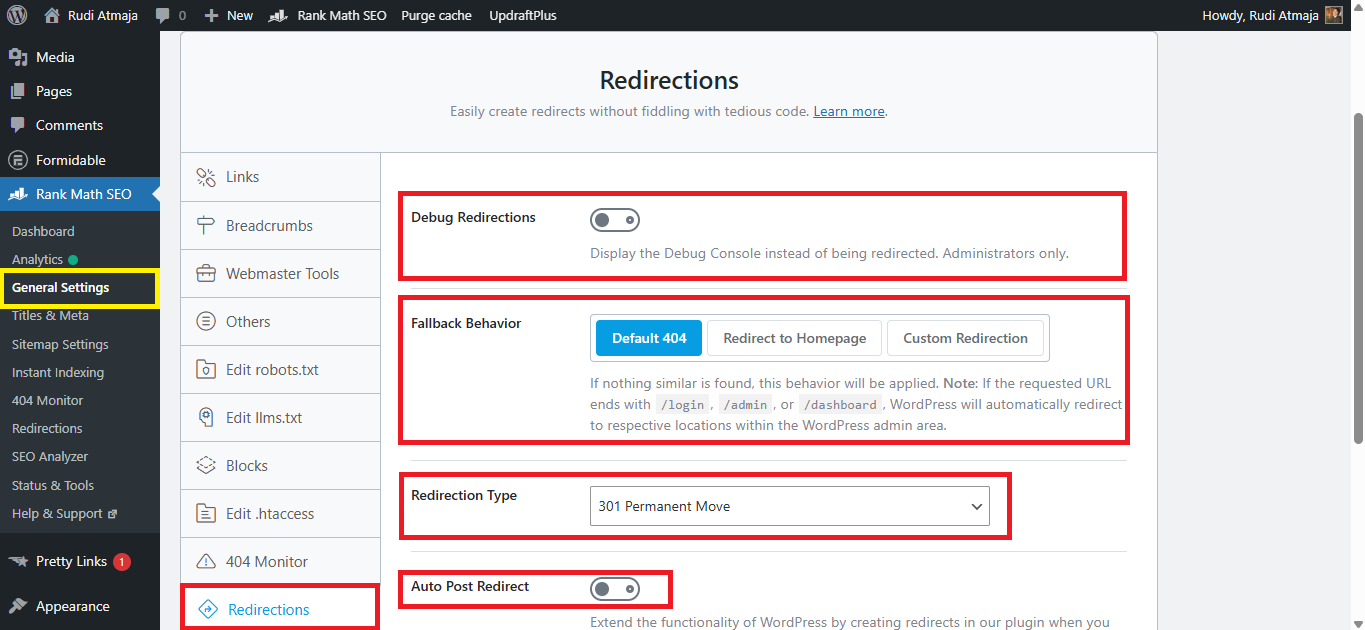
Next, we have the Redirections feature in Rank Math SEO. This feature helps you manage URL redirects on your website without needing an extra plugin. It’s especially useful when you change URLs, delete pages, or want to send users from one page to another.
With redirections, you can make sure visitors don’t land on broken or outdated pages. Instead, they are automatically sent to a relevant page on your site. This improves user experience and helps preserve any SEO value from old URLs.
One of the settings available here is Debug Redirections. This option allows you to track and log how your redirects are working. It’s helpful if you want to troubleshoot issues or see whether a redirect is functioning correctly.
There’s also Fallback Behavior, which determines what happens when a redirect doesn’t match any specific rule. For example, you can choose whether users are redirected to the homepage or shown a 404 page. This gives you more control over how unexpected cases are handled.
Another important setting is Redirection Type. This lets you choose between different types of redirects, such as 301 (permanent) or 302 (temporary). Each type serves a different purpose, depending on whether the change is permanent or not.
Lastly, there’s Auto Post Redirect, which automatically creates redirects when you change a post URL. This means you don’t have to manually set up redirects every time you update a permalink. It helps prevent broken links without adding extra work.
1.13. Schema
Next, we have the Schema feature in Rank Math SEO. This feature allows you to add structured data to your content so search engines can better understand what your pages are about. It plays an important role in helping your content appear with rich results in search engines.
With this feature, you can set schema for each type of content on your website. That means posts, pages, or custom post types can all have their own schema settings. This gives you more control over how your content is interpreted and displayed in search results.
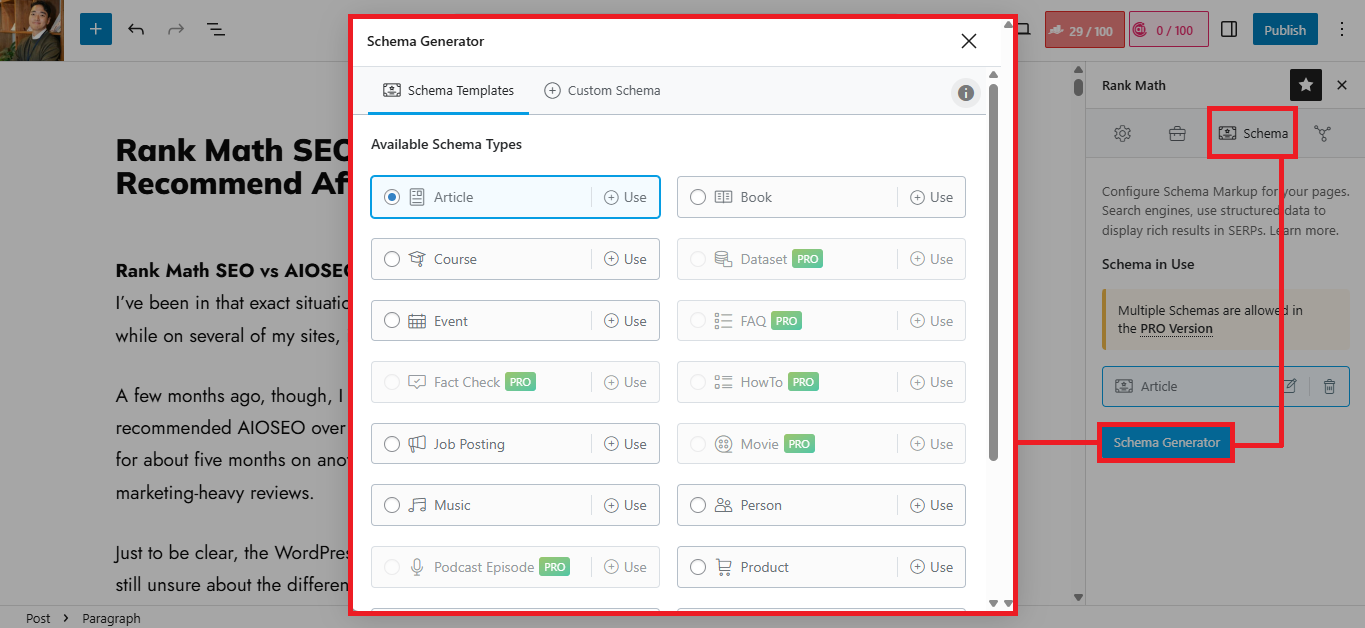
Rank Math also provides ready-to-use schema templates to make things easier. In the free version, you can choose from several templates like Article, Book, Course, Event, Job Posting, Music, Person, Product, Recipe, Restaurant, Service, Software, and Video. You can apply one schema per content, depending on what fits best.
These templates help simplify what would otherwise be a technical process. Instead of writing schema code manually, you can just select a template and fill in the required details. This makes structured data much more accessible, even if you’re not very technical.
For users on the Pro version and above, there are even more options available. They get access to additional schema templates and the ability to use multiple schema types on a single piece of content. This opens up more flexibility for advanced SEO strategies.
1.14. Sitemap
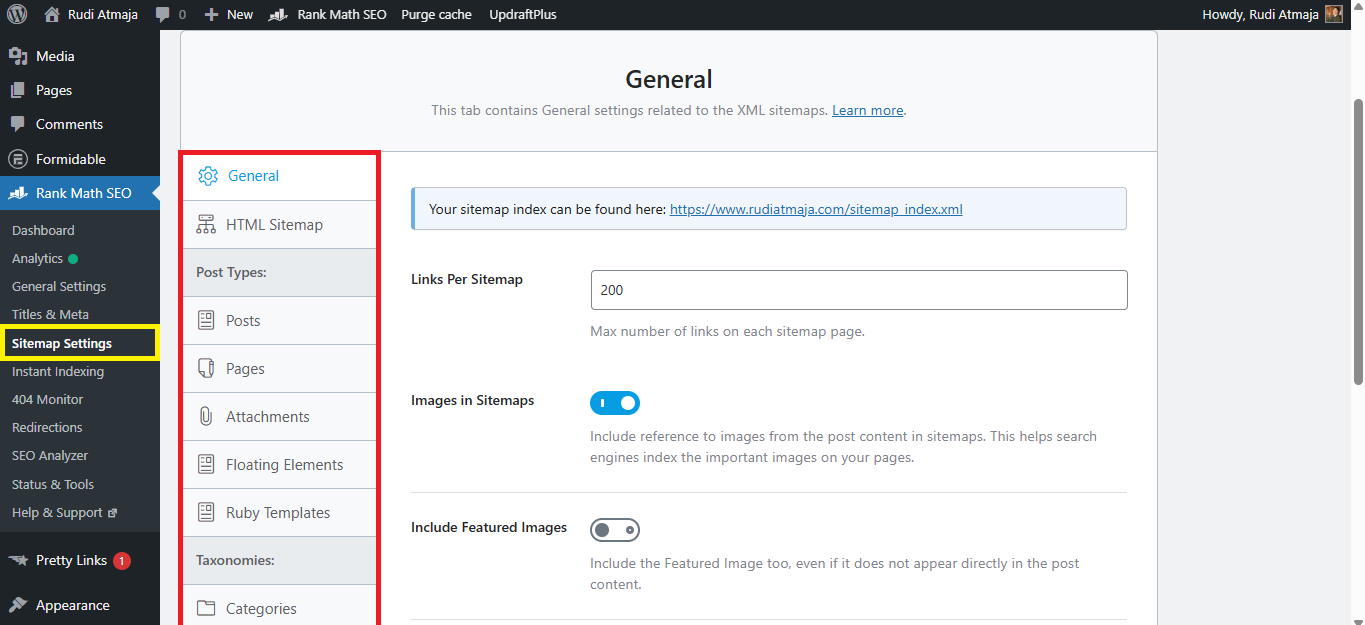
Next, we have the Sitemap feature in Rank Math SEO. This feature helps you generate sitemaps that make it easier for search engines to discover and crawl your content. It’s an essential part of ensuring your website is properly indexed.
Rank Math supports XML sitemaps, which are commonly used by search engines like Google. These sitemaps list your important pages, posts, and other content so search engines can find them more efficiently. You can also customize what gets included, such as specific post types or taxonomies.
In addition to XML, Rank Math also provides an HTML sitemap. This type of sitemap is more user-friendly and can be displayed on your website for visitors to navigate your content more easily. It’s a nice addition that improves both usability and site structure.
1.15. Google Web Stories
Next, we have Google Web Stories integration in Rank Math SEO. This feature works with the Google Web Stories plugin to help optimize your visual, story-based content for search engines. It ensures that your web stories are properly structured and can be discovered more easily.
With this integration, you can apply SEO settings to your web stories just like you would with regular posts. This includes things like meta titles, descriptions, and other important elements. It helps your stories have a better chance of appearing in search results and Google Discover.
This is especially useful if you’re using web stories as part of your content strategy. Instead of treating them as standalone visuals, you can fully optimize them for SEO. That way, your stories don’t just look good, but also contribute to your overall traffic.
1.16. WooCommerce
Next, we have WooCommerce integration in Rank Math SEO. This feature is designed for websites that run an online store using WooCommerce. It helps ensure that your product pages are properly optimized for search engines.
With this feature, you can customize important SEO elements for your products. This includes titles, meta descriptions, and even how your products appear in search results. It gives you more control compared to relying on default WooCommerce settings.
Rank Math also adds structured data for your products automatically. This includes details like price, availability, and ratings, which can appear as rich snippets in search results. These enhancements can make your listings more attractive and clickable.
This integration is especially useful if you want to improve visibility for your products. Instead of just listing items, you can optimize each product page to compete better in search engines.
1.17. Content Analysis
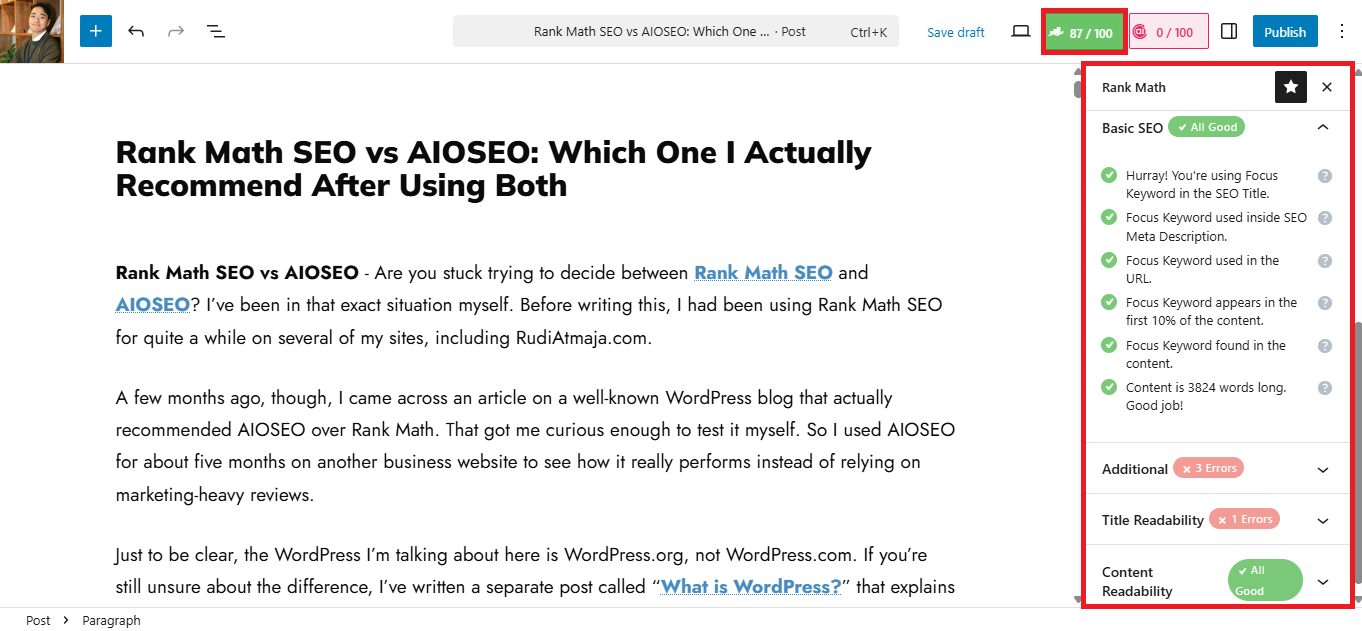
Next, we have the Content Analysis feature in Rank Math SEO. This is one of the main features you’ll probably use the most while writing content. It gives you real-time feedback so you can optimize your article as you go.
Rank Math uses a scoring system that ranges from 0/100 up to 100/100. The higher your score, the better your content is optimized based on their recommendations. This makes it easy to quickly judge whether your content is already in good shape or still needs improvement.
In the free version, you can optimize your content for up to five focus keywords. This gives you more flexibility compared to tools that only allow a single keyword. It’s especially helpful if your content targets multiple related search terms.
As you write, Rank Math analyzes different aspects like keyword usage, headings, readability, and other SEO factors. It then provides suggestions you can follow to improve your score. Everything is presented in a simple checklist, so it’s easy to understand even if you’re a beginner.
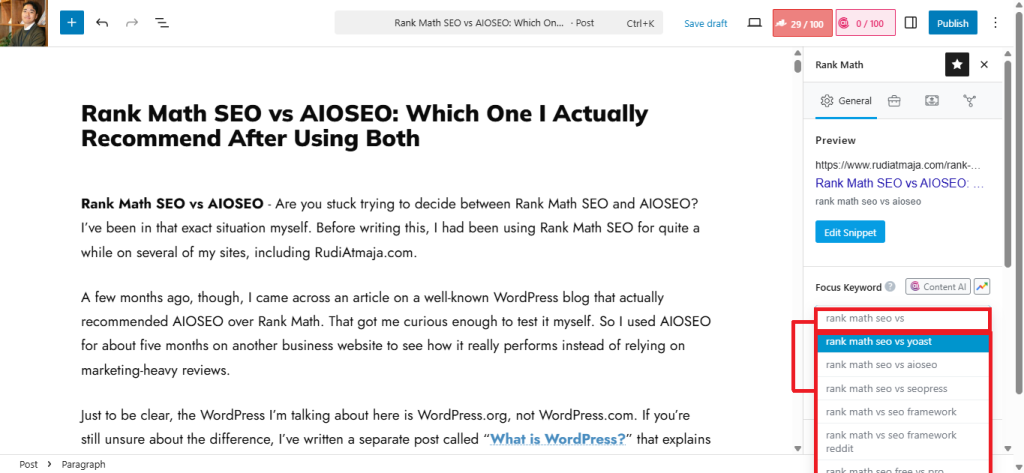
There’s also a built-in keyword suggestion feature where you just type in two or three words. Rank Math will then show a list of keyword ideas that might match your content. This can help you discover additional keywords without needing separate tools.
2. AIOSEO
Now that we’ve gone through the features offered by Rank Math SEO, let’s switch things up and take a look at AIOSEO. It’s only fair to see what the other side brings to the table before making any conclusions.
Just like Rank Math, AIOSEO also comes with a wide range of features designed to help optimize your website. Some of these are available in the free version, while others are reserved for premium users. So it’ll be interesting to see how they compare.
In the next section, we’ll break down the features included in AIOSEO and see how they stack up. This should give you a clearer picture of which plugin fits your needs better.
2.1. Sitemap
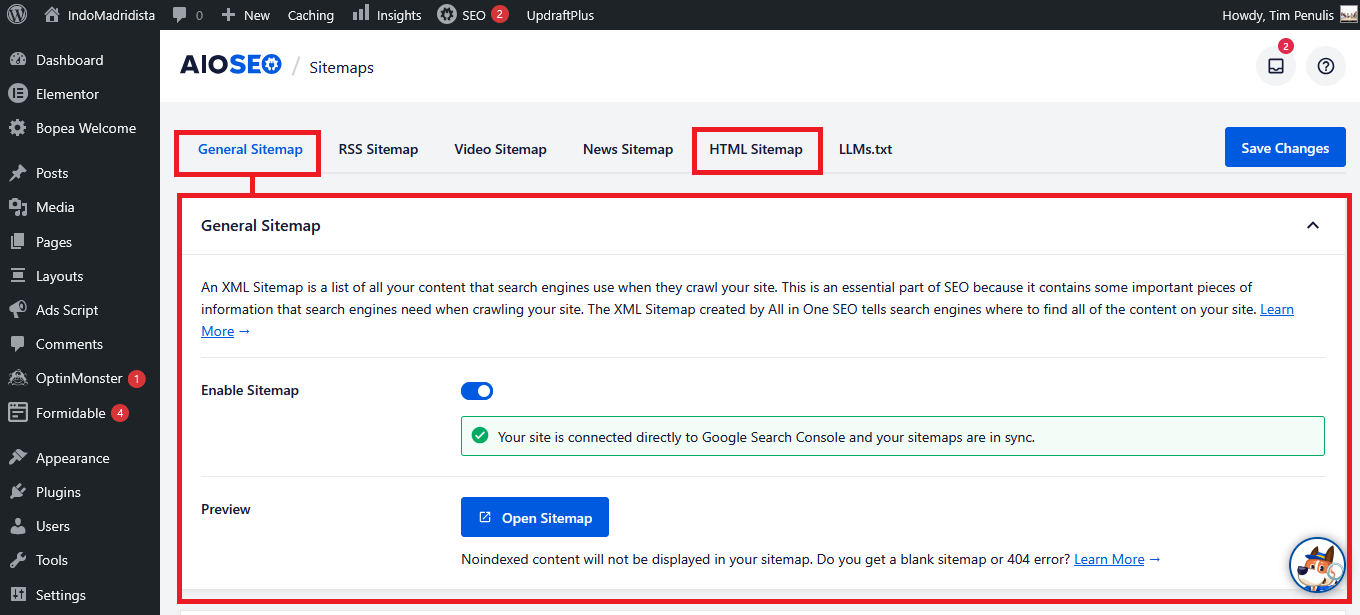
Let’s start with the Sitemap feature in AIOSEO. This is one of the basic but essential features in any SEO plugin. It helps search engines discover and understand the structure of your website more easily.
AIOSEO includes support for XML sitemaps, which are used by search engines like Google to crawl your content. These sitemaps list your posts, pages, and other content types in a structured format. You can also control what gets included depending on your needs.
You’re not limited to just XML, because AIOSEO also provides an HTML sitemap. This version is meant for visitors, allowing them to browse your content in a more organized way. It can be displayed on a page to improve navigation across your site.
Both sitemap types can be configured directly from the plugin settings. You can choose specific post types or taxonomies to include or exclude. This gives you better control over how your content is presented to both users and search engines.
2.2. Analytics
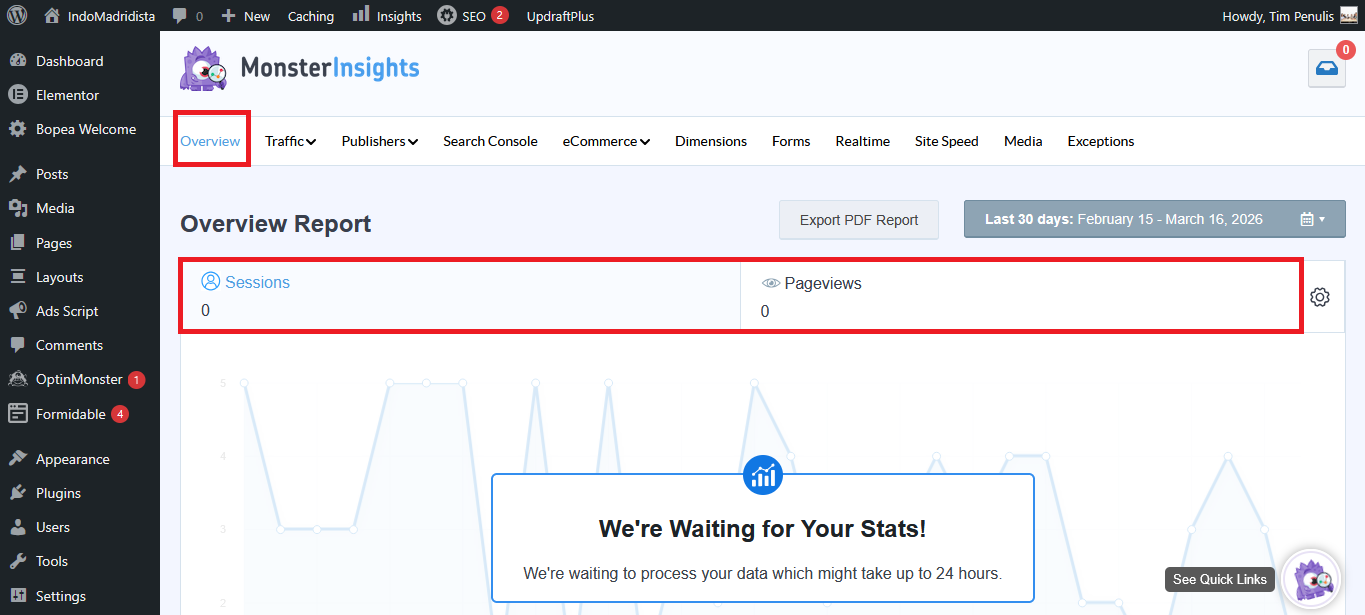
Next, we have the Analytics feature in AIOSEO. This feature is a bit different compared to Rank Math because it doesn’t work fully on its own. To use it, you’ll need to install an additional plugin called MonsterInsights.
Once you connect AIOSEO with MonsterInsights, you can start viewing your website data directly from your dashboard. This integration pulls data from Google Analytics and presents it in a simpler format. It’s designed to make analytics easier to understand, especially for beginners.
From there, you’ll get a general overview of your website performance. This includes metrics like sessions and pageviews, which show how many people are visiting your site. You’ll also see Avg. Session Duration and Bounce Rate to understand how users interact with your content.
You can also view Device Breakdown data, which shows whether your visitors are coming from desktop, mobile, or tablet. This is helpful for understanding how your site performs across different devices. It can also guide you in optimizing your site for mobile users.
In addition, there are reports like Top 10 Countries and Top 10 Referrals. These show where your traffic is coming from, both geographically and from other websites. It gives you a clearer picture of your audience and traffic sources.
Lastly, you can see your Top Posts/Pages based on performance. This helps you identify which content is bringing in the most traffic. From there, you can focus on improving or updating your best-performing pages.
2.3. Social Networks
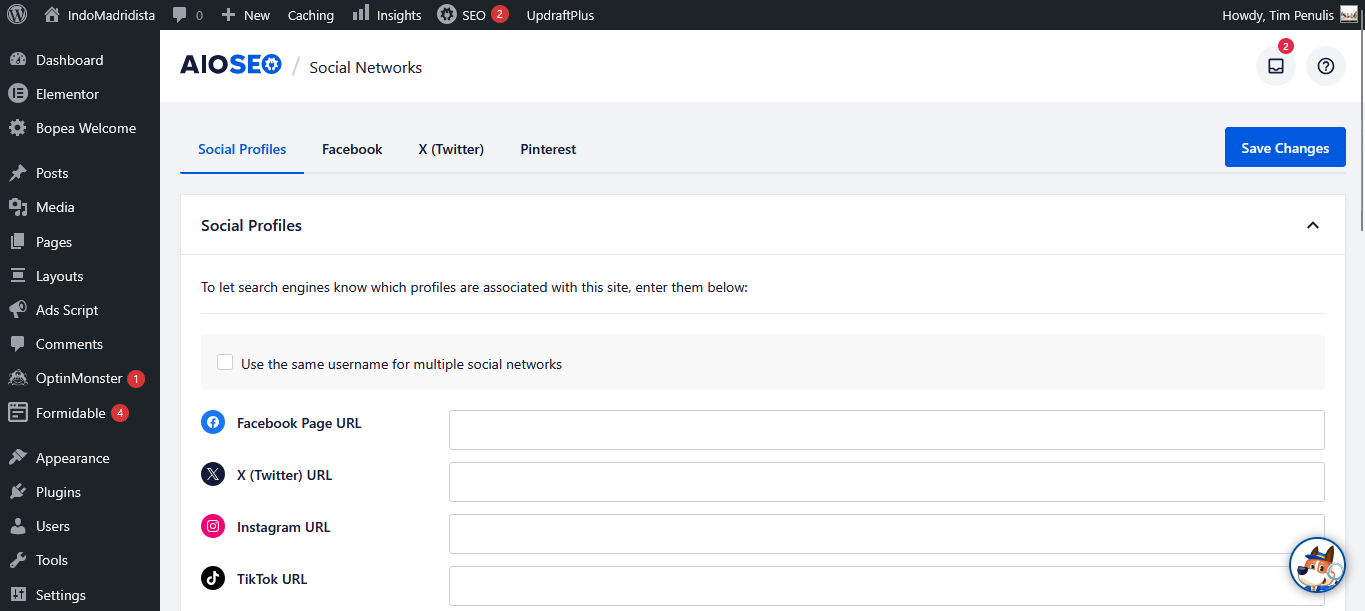
Next, we have the Social Networks feature in AIOSEO. This feature helps you control how your content appears when it’s shared on platforms like Facebook and Twitter. It ensures your links look clean, professional, and more clickable.
With this feature, you can customize elements like the title, description, and image that show up on social media. This is useful because the default settings don’t always display your content the way you want. By adjusting these settings, you can make your posts more engaging when shared.
AIOSEO also supports Open Graph and Twitter Card integration. This allows social platforms to properly read and display your content. As a result, your shared links look more polished and consistent across different platforms.
2.4. Content Analysis
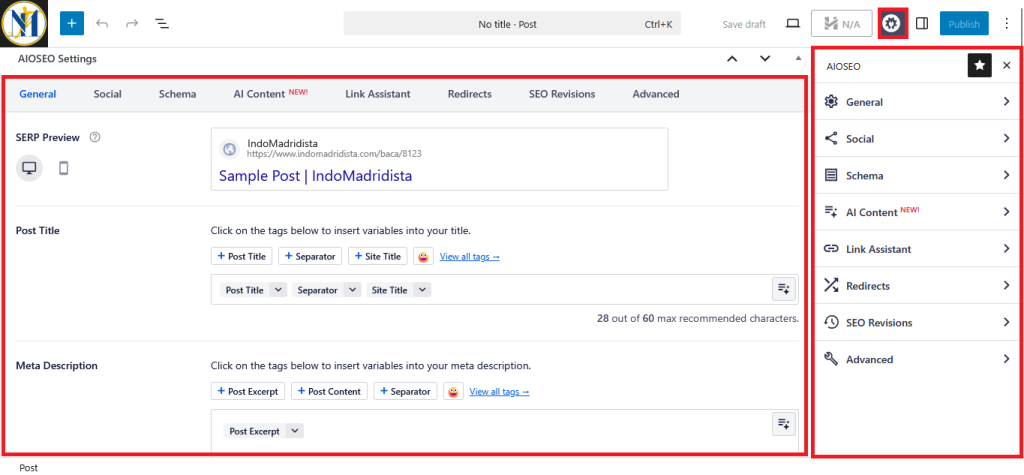
Next, we have the Content Analysis feature in AIOSEO. This is where you manage most of your on-page SEO settings while creating content. You can access it by clicking the AIOSEO icon in the top right corner or by scrolling down to the AIOSEO Settings box.
Inside this section, you can set your focus keyword for the content. Unlike Rank Math, the free version of AIOSEO only allows you to use one keyword. You can also customize your meta title and meta description directly from here.
There are also options to control how your content appears on social media. You can adjust the title, description, and image for platforms like Facebook and Twitter. This helps ensure your content looks more appealing when shared.
However, one limitation in the free version is that you can’t mark content as pillar or cornerstone content. This feature is only available in the paid version. So if you rely on content structuring like that, it’s something to keep in mind.
2.5. Headline Analyzer
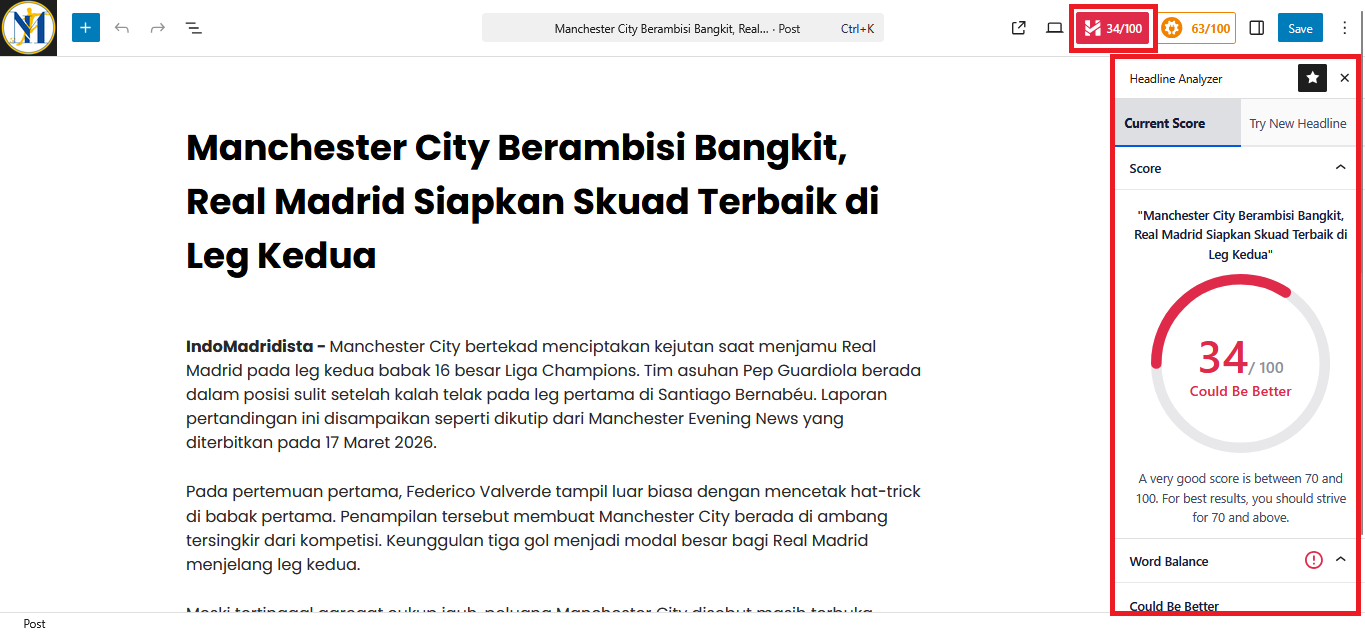
Another feature you’ll find in AIOSEO is the Headline Analyzer. This tool is designed to help you craft better titles for your posts or pages before you publish them. Instead of guessing what might work, you can run your headline through the analyzer and get immediate feedback.
With the Headline Analyzer, you can test different variations of your title in just a few seconds. It looks at factors like word balance, structure, and overall readability to give you a clearer picture of how your headline performs. This makes it easier to experiment and fine-tune your title until it feels right.
You can also use it as a guide when you’re not sure how to start writing a headline. By entering a few ideas, the tool helps you shape them into something more engaging and structured. It’s especially useful when you want your title to grab attention while still staying relevant to the content.
Everything happens directly inside the AIOSEO interface, so you don’t need to rely on external tools. You can analyze, adjust, and finalize your headline in the same place where you manage your SEO settings. This keeps the whole process simple and connected to your overall workflow.
2.6. AI Content
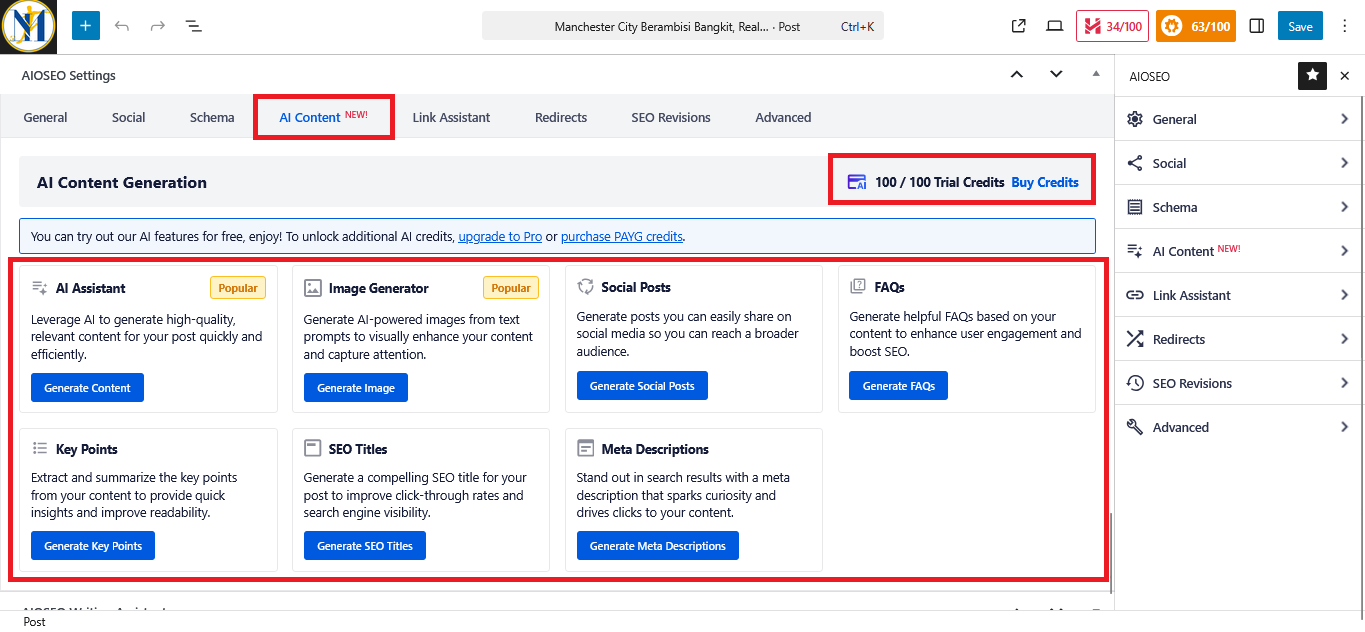
AIOSEO also includes an AI content feature that you can use directly inside the plugin. This feature works with a credit-based system, where you’re given 100 trial credits to start using it. Each time you interact with the AI for content-related tasks, it uses a portion of those credits.
With this AI feature, you can generate content without having to leave your WordPress dashboard. It can be used to write sections of text, create drafts, or help shape ideas into something more structured. Everything happens within the plugin, so the process feels more integrated into your workflow.
It can also be used to refine and adjust content that you’ve already written. For example, you can use it to rephrase sentences, expand certain parts, or make your writing more aligned with your intended topic. This makes it useful when you want to improve clarity or adjust the tone of your content.
On top of that, the AI can assist with creating SEO-focused content. You can use it to generate titles, descriptions, or other elements that support your overall optimization strategy. So rather than starting from scratch every time, you have a tool that helps guide and shape your content directly inside AIOSEO.
2.7. LLMS.txt
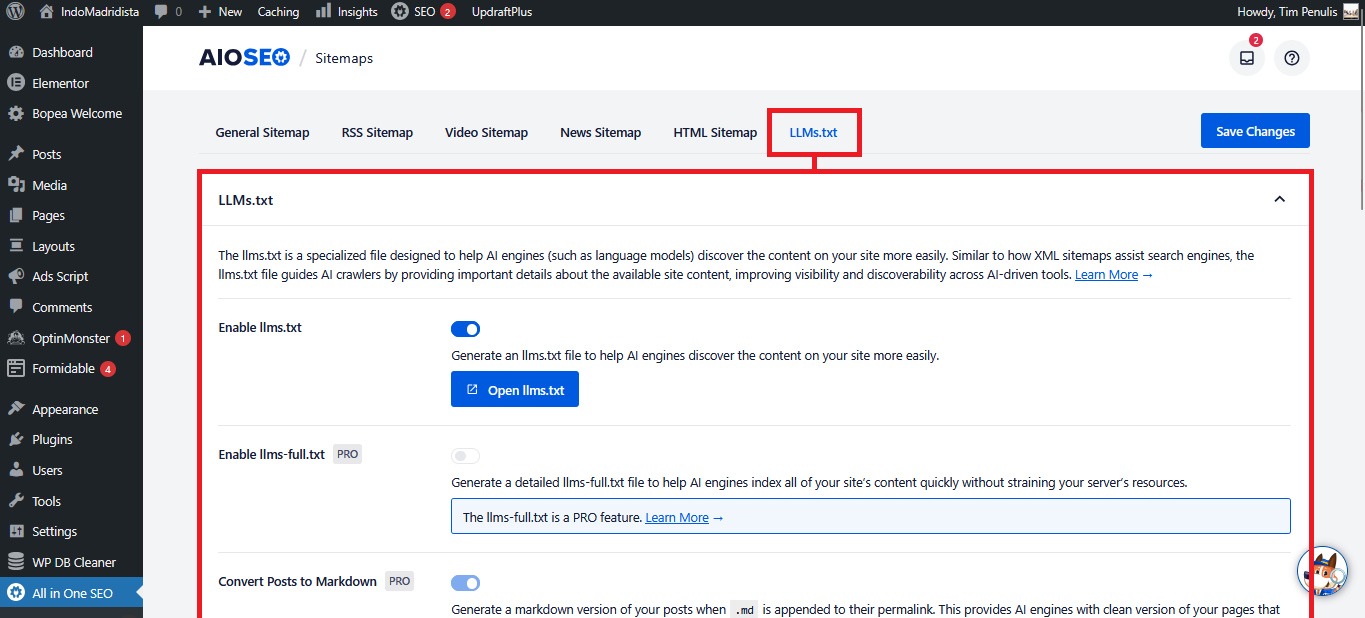
Another feature you’ll come across in AIOSEO is LLMS.txt. This file is designed to communicate specific instructions to AI systems and language models that access your website. It works in a similar way to robots.txt, but instead of guiding search engine crawlers, it focuses on how AI tools interact with your content.
With LLMS.txt, you can define how your site’s content can be used by AI. For example, you can specify whether your content is allowed to be accessed, referenced, or used for training purposes. This gives you a way to set clear boundaries directly from your website.
You can manage and generate this file directly through AIOSEO without needing to manually create it. The plugin provides an interface where you can configure the rules based on your preferences. Once set up, the file becomes part of your site’s structure and can be read by supported AI systems.
This feature is mainly used to give website owners more control over how their content is handled by AI technologies. Instead of leaving it open by default, you can define clear instructions in a structured way. It becomes a simple method to communicate your content usage preferences to AI platforms.
3. Which One Do I Recommend?
Now let’s get into the final question, which plugin do I actually recommend after trying both? After spending time using both Rank Math SEO and AIOSEO on different sites, I ended up leaning pretty clearly in one direction. And the main reason comes down to overall value, especially in the free version.
I personally recommend Rank Math SEO over AIOSEO. It simply gives you more useful features right out of the box without forcing you to upgrade. For most users, especially beginners or small business owners, this makes a big difference.
One of the biggest downsides of AIOSEO is that many basic features are locked behind the paid version. Things like redirections and the ability to mark content as pillar (cornerstone content) are not available for free. These are not really “advanced” features, they’re pretty fundamental for SEO.
Another issue is that some features require additional plugins to work properly. For example, analytics and broken link tracking depend on tools like MonsterInsights and other integrations. From my experience, adding these extra plugins made my site feel slightly slower.
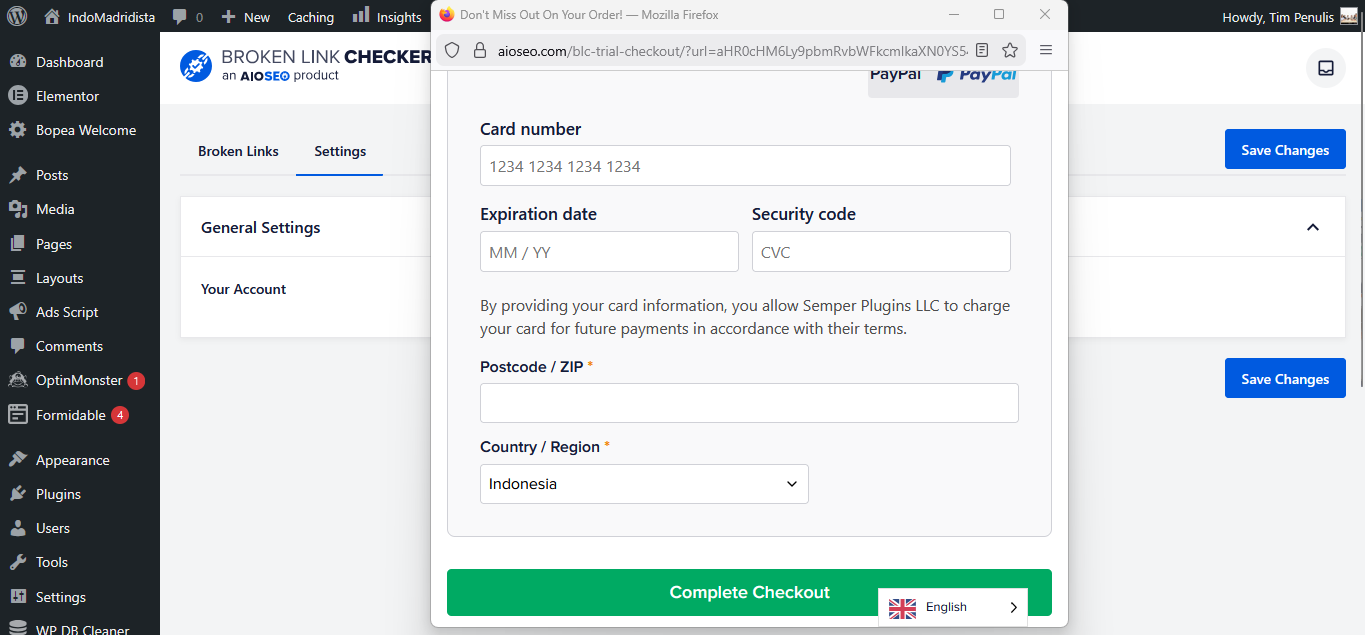
On top of that, using those additional tools often requires creating accounts and even entering credit card details. This can be risky if you’re not paying close attention, especially when free trials expire. You might end up getting charged without realizing it.
I also noticed that using AIOSEO resulted in a lot of incoming emails. Not only from AIOSEO itself, but I was also automatically subscribed to WPBeginner newsletters. Then after signing up for MonsterInsights and Broken Link Checker, I started receiving emails from them as well, which quickly became overwhelming.
Lastly, even though AIOSEO offers 100 free AI credits, I don’t find it very useful. Those credits run out very quickly, sometimes in just a few uses.
>>> Get Rank Math SEO <<< | >>> How to Setup & Optimize With Rank Math <<<
Final Thoughts
After spending quite some time using both Rank Math SEO and AIOSEO, I’ve come to see that each plugin offers its own approach to handling SEO inside WordPress. They both cover the essentials and go beyond that with additional features that can support different types of users. In the end, it really comes down to how you prefer to manage your workflow and what feels more natural for you.
Throughout this article, I’ve shared my experience based on actually using both plugins on real websites. I didn’t just rely on features listed on paper, but also how those features work in day-to-day use. That’s important, because sometimes what looks good in theory doesn’t always translate the same way in practice.
So rather than focusing on which one is objectively better, it makes more sense to think about which one fits your needs. Every website is different, and what works for me might not always be the perfect choice for you. At the end of the day, the best plugin is the one that helps you manage your SEO more comfortably and consistently.